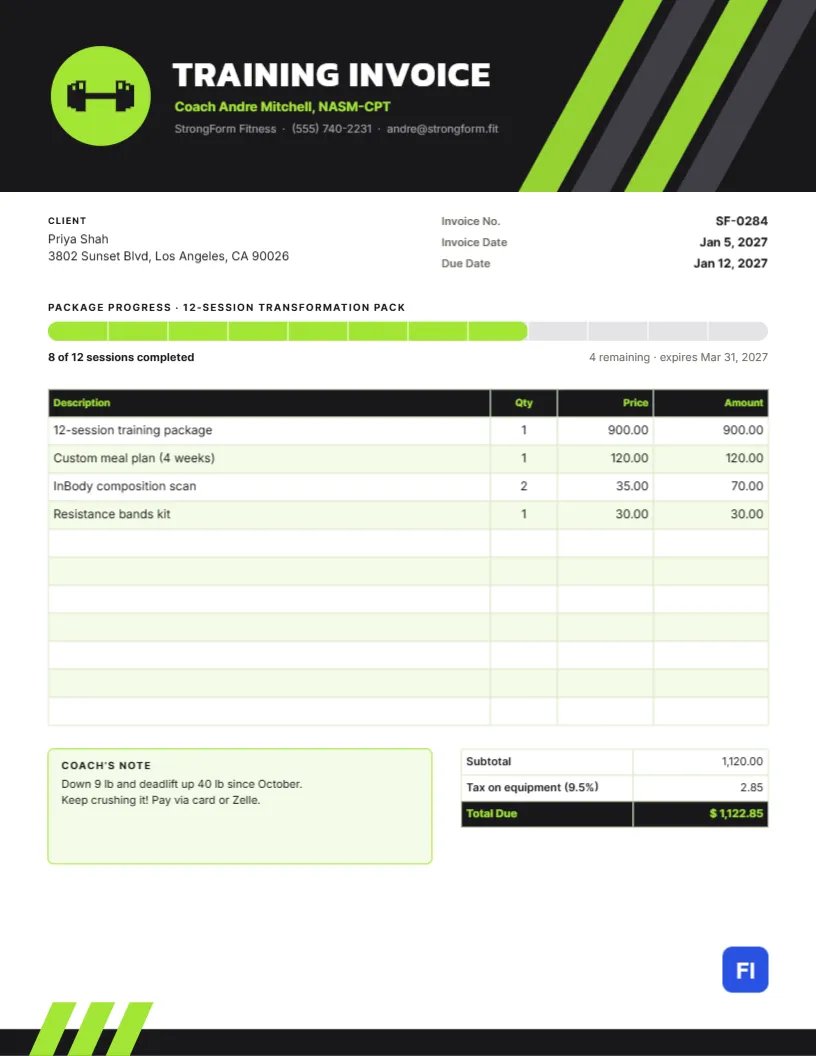
Clients hire a personal trainer to get results, and they stay because they can see them. Your invoice can help with that. Instead of a plain list of sessions, this Personal Trainer Invoice Template shows a progress bar for the client’s session package, a note from the coach about their gains, and the charges in a clean, athletic layout. It looks like a sports brand, and it keeps clients motivated to renew.
Trainers, Coaches and Fitness Studios
Independent personal trainers, strength and conditioning coaches, online coaches, yoga and Pilates instructors, boxing coaches and small studios can all use it. The sample shows Coach Andre Mitchell, a certified trainer at StrongForm Fitness, invoicing client Priya Shah for a twelve-session transformation pack, a four-week custom meal plan, two body composition scans and a resistance band kit.
Speed Stripes and a Dumbbell
A charcoal band fills the top of the page. On its right, four bold diagonal stripes in lime and dark gray slash upward, like the stripes on running shoes or a race kit, giving the header a sense of speed. On the left, a lime circle holds a charcoal dumbbell. TRAINING INVOICE is set in white Knit capitals, with the coach’s name and certification in lime and the studio name, phone, and email in gray. At the bottom, a slim charcoal band repeats three short lime stripes in the left corner, so the page feels like one kit from top to bottom.
The client block and the invoice number, invoice date, and due date sit under the header. Then comes the signature feature, a package progress bar: a rounded track divided into twelve segments, with eight filled in lime, and captions reading 8 of 12 sessions completed and 4 remaining · expires Mar 31, 2027. The charges table has a charcoal header with lime headings, followed by a lime-bordered Coach’s note and the totals.
Tracking a Session Package Step by Step
Packages are the backbone of most training businesses. Here is how to keep the progress bar accurate from invoice to invoice:
- When the client buys a package, invoice it in full and set the bar to zero sessions completed.
- After each month, count the sessions attended and fill in that many segments in lime; leave the rest gray.
- Update the caption with sessions completed, sessions remaining, and the expiry date from your policy.
- When two or three sessions remain, mention renewal options in the coach’s note.
- When the package is finished, invoice the next one and start a fresh bar.
The segments are simple shapes grouped; select an individual segment and change its color to mark a session as done.
Charges in the Sample
The training package costs $900, the meal plan $120, two scans $70, and the bands $30, for a subtotal of $1,120.00. Sales tax applies only to the physical equipment in the sample, adding $2.85, for a total of $1,122.85. Personal training services are not taxed in many places, but the rules vary, so check locally.
A Coach’s Note That Sells the Next Package
The note is where you celebrate progress in numbers: pounds lost, lifts improved, minutes shaved off a mile. Down 9 lb and deadlift 40 lb since October is proof that the investment is paying off. Keep it upbeat and specific, and end with a nudge toward the next goal.
Editing the Charges
The charges list is an editor table. Double-click it or open Edit Table Data to change its lines, then + Add Row for extras like nutrition coaching or merchandise and – Remove Last to tidy up. The cells hold text, so recalculate the subtotal, tax, and total by hand after any change.
Switching the Color Scheme
Lime on charcoal is bold and energetic. If your brand is orange, electric blue or hot pink, change the speed stripes, the badge circle, the coach’s name, the progress bar fill and the Total Due text together. The dumbbell is an editable vector; swap it for a kettlebell, a running shoe, or a yoga figure from the library to suit your discipline.
Late Cancellations and Package Expiry
Trainers lose income when clients cancel at the last minute. Most count a late cancellation as a used session and set an expiry date on packages to keep clients consistent. Write both policies in your agreement and show the expiry date on every invoice, as the progress caption does. Clients respect clear rules, especially when they are applied consistently.
Online and Hybrid Coaching
If you coach remotely, replace session counts with weeks of programming or check-ins, and list app access or video form reviews as separate lines. The progress bar works just as well for a twelve-week online program: each segment becomes a week instead of a session.
Print and PDF
The page is US Letter, 8.5 x 11 inches. Send the PDF by email or through your coaching app. The charcoal header is ink-heavy, so if a client asks for a printed copy, print on a laser printer or choose high quality on an inkjet for a clean black.
Corporate Wellness and Group Classes
Companies that sponsor wellness programs and clients who join small-group sessions need slightly different invoices. For a company, bill the organization with its purchase order number and list sessions by date and headcount. For small groups, invoice each member for their share and note the group name in the description, so members can see they are paying the group rate rather than the one-to-one price.
Why Clients Renew When They See Progress
Most clients do not quit training because of price; they quit when they stop noticing results. An invoice that shows sessions completed and a measurable win every month keeps the goal in view. Pair it with a quick re-assessment every six to eight weeks, record the numbers in the coach’s note, and renewal becomes a natural next step rather than a sales conversation.
Personal Trainer Invoice FAQs
Can I bill single sessions instead of packages?
Yes. Delete the progress bar and list each session with its date.
Should I include the gym’s name?
If you train at a commercial gym, mention it in the header line so clients remember where sessions take place.
Can I add before-and-after photos?
Only with the client’s permission. Most trainers keep progress photos private and out of invoices.