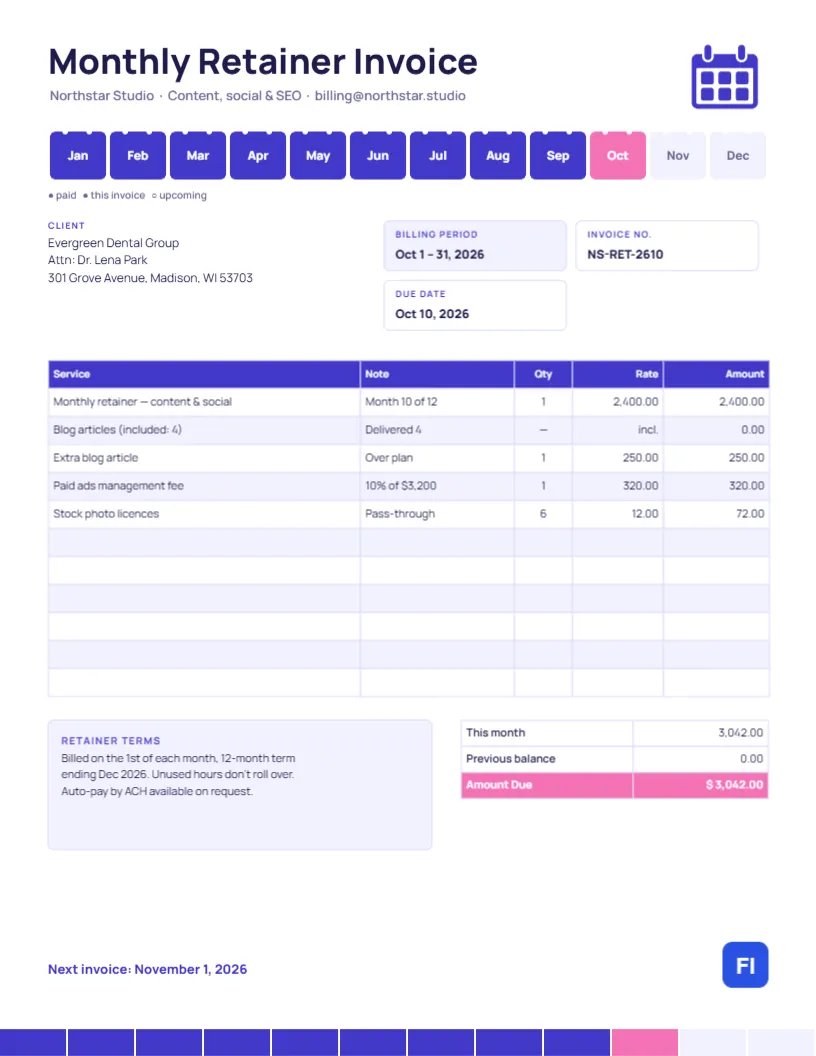
Recurring work is the most valuable work a small business can have: the same client, the same service, every month. It deserves an invoice designed for repetition. A retainer invoice should tell the client at a glance which month is being billed, how far through the agreement you are, what is included and what is extra, and when the next invoice will arrive. This Monthly Retainer Invoice Template does all of that, starting with a row of twelve calendar tabs across the top of the page.
Agencies, Freelancers and Subscription Services
It suits marketing and content agencies, social media managers, SEO consultants, virtual assistants, IT support contracts, cleaning and maintenance contracts, software and subscription services, and any business billing a fixed monthly fee. The sample shows Northstar Studio billing Evergreen Dental Group for October, month ten of a twelve-month content, social and SEO retainer, with an extra blog article, a paid ads management fee, and stock photo licenses.
Twelve Tabs, One Year
Beneath the title, a strip of twelve rounded calendar tabs runs across the page, one for each month from January to December, each with two small binding holes at the top like a desk calendar. January to September are filled in deep indigo, meaning paid. October, the month being billed, is bright pink. November and December are pale lavender, still to come. A small legend below the strip explains the colors. The same twelve-color sequence repeats as a slim band along the bottom edge of the page, so the year frames the whole invoice.
Monthly Retainer Invoice is set in heavy Manrope at the top, with the studio’s name, services, and billing email beneath, and an indigo calendar icon in the top-right corner. The client block sits on the left, and three small cards on the right hold the billing period, the invoice number, and the due date. The services table includes a Note column for things like Month 10 of 12 or Over plan. A Retainer terms box sits beside the totals, and Next invoice: November 1, 2026 is printed in indigo at the bottom.
Clauses to Put in Every Retainer Agreement
A retainer invoice works smoothly only when the agreement behind it is clear. These points prevent most disputes:
| Clause | What It Settles |
|---|---|
| Monthly fee and billing date | How much, and when each invoice is issued |
| Included deliverables or hours | What the fee covers each month |
| Rollover policy | Whether unused hours or items carry forward |
| Overage rate | How extra work is priced |
| Pass-through costs | Ad spend, licenses, and tools billed at cost or with a fee |
| Term and notice | How long the retainer runs and how either side can end it |
Summarize the key terms in the Retainer terms box on the invoice, as the sample does.
Included Work, Extras and Pass-Through Costs
Retainer invoices are easiest to read when included work is shown even though it costs nothing extra. The sample lists four included blog articles at 0.00, marked incl., then bills a fifth as an extra. Ads management is charged as ten percent of the client’s ad spend, and stock photos are passed through at cost. October’s total is $3,042.00.
Updating the Calendar Tabs Each Month
Each month, change the color of the tab being billed to pink and the previous month’s tab to indigo. The tabs are grouped, so select the group and then click an individual tab to recolor it. The month labels are separate text, so if your retainer runs from, say, April to March, just retype the labels in order. Do the same for the footer band.
Editing Services and Cards
The services list and totals are editor tables. Double-click them or use Edit Table Data, and add or remove lines with + Add Row and – Remove Last. The billing period, invoice number, and due date cards are plain text on rounded shapes. The cells do not calculate, so add up each month’s charges and type the total yourself.
Recoloring the Year
Indigo, pink, and lavender give the page a modern, tech-studio feel. For a different brand, choose three colors: one for paid months, one bright accent for the current month, and one pale tone for upcoming months. Apply them to the tabs, the footer band, the table header, and the Amount Due row. The calendar icon is an editable vector that can take the same accent.
Sending Recurring Invoices on Schedule
The page is US Letter, 8.5 x 11 inches. Send the invoice on the same day every month; the sample bills on the 1st and asks for payment by the 10th. Duplicate last month’s page, update the tabs, invoice number, period, and any extras, and download the PDF. A reliable rhythm trains clients to pay reliably too.
Auto-Pay for Retainers
Retainers are ideal for automatic payment. Offer ACH debit or a card on file, as the sample’s terms mention, and send the invoice as a record of each charge. Clients who pay automatically rarely pay late, and you spend less time chasing.
Renewals and the Final Months
When a retainer approaches its last months, the calendar strip makes the end date obvious to the client as well as to you. Use the Retainer terms box on the tenth or eleventh invoice to invite a renewal conversation, and suggest any changes to the scope or fee for the coming year. Clients who can see a year of steady delivery in the tabs are usually happy to continue.
Mid-Month Starts and Prorating
Retainers rarely begin neatly on the 1st. If a client signs on the 12th, bill the first month prorated, for example, nineteen of thirty-one days, and say so in the Note column. From the second month onward, invoice the full fee on your normal billing date. The same approach works when a retainer ends mid-month or the fee changes partway through.
Retainer Invoice FAQs
Can I use this for quarterly retainers?
Yes. Relabel the tabs Q1 to Q4 and delete the extra tabs, or keep monthly tabs and color three at a time.
How do I show unused hours rolling over?
Add a line such as Rollover hours from September: 3 with no charge, and note the rollover limit in the terms.
What if the client pauses the retainer?
Color the paused months gray and add a note in the terms box explaining the pause.