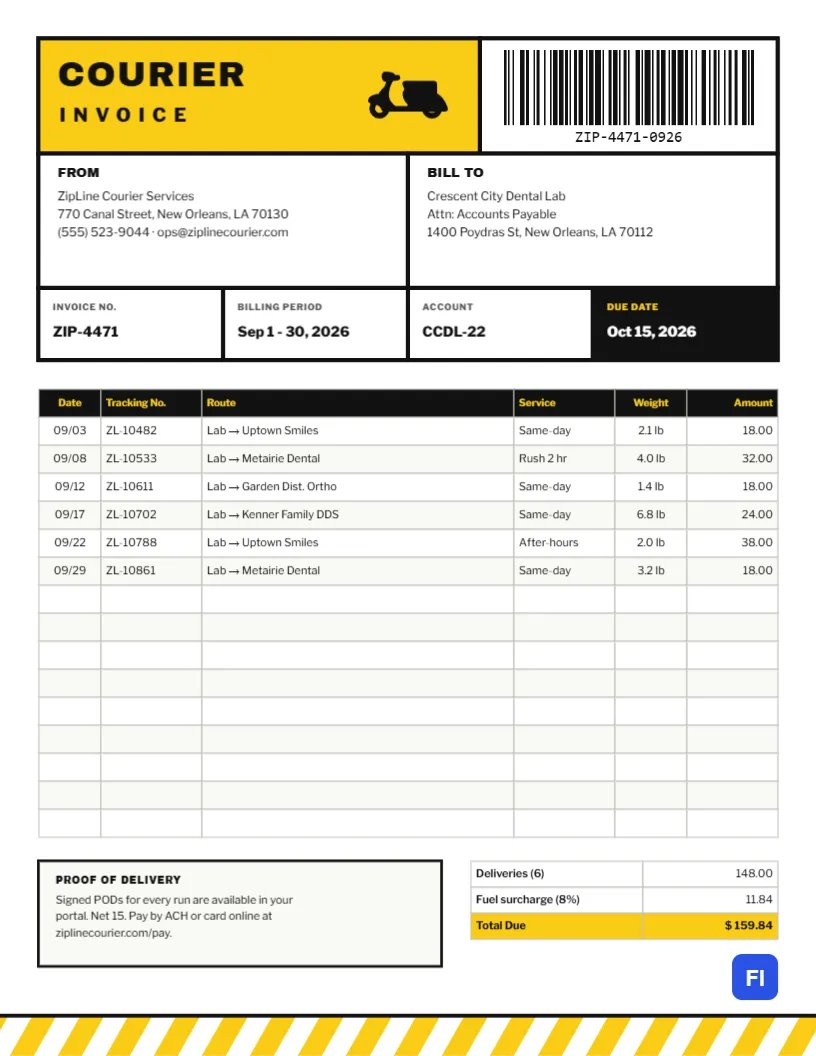
Courier companies live by labels, barcodes and tracking numbers, so why should their invoices look like anyone else’s? This Courier and Delivery Invoice Template borrows the look of a shipping label: thick black borders, a bright yellow title block, a barcode in the corner and a grid of boxes for the key details. Underneath, a delivery log lists every run in the billing period by date, tracking number, route, service and weight, so business customers can match each charge to a delivery.
Couriers, Delivery Drivers and Same-Day Services
It suits local courier companies, same-day and medical couriers, bike and scooter messengers, gig drivers running their own delivery business, restaurant delivery services billing corporate accounts, and small logistics firms. The sample shows ZipLine Courier Services invoicing Crescent City Dental Lab for a month of deliveries of dental work to practices around New Orleans, with same-day, rush, and after-hours services.
Built Like a Parcel Label
The top of the page is a label drawn with heavy black rules. A yellow block on the left holds COURIER in large Archivo Black letters with INVOICE spaced out beneath it and a black delivery scooter speeding to the right. A white panel on the right carries a CODE128 barcode with its number printed underneath. Below them, two boxes labeled FROM and BILL TO hold the addresses, and a row of four boxes gives the invoice number, billing period, account number and, in a solid black box with yellow lettering, the due date.
The delivery log follows, with a black header in yellow type and six columns: Date, Tracking No., Route, Service, Weight and Amount. Beneath it, a Proof of Delivery box with a black border explains where signed PODs can be found and how to pay, and the totals table adds a fuel surcharge to the delivery charges and ends in a yellow Total Due. The footer is a band of diagonal yellow and white hazard stripes above a black line, like the edge of a loading dock.
What to Record for Each Delivery
Business customers approve courier invoices faster when every line can be traced. For each run, record:
- Date: the pickup date, or both pickup and delivery dates for overnight runs.
- Tracking number: your job or waybill number, the key to your proof-of-delivery records.
- Route: origin to destination, using names the customer recognizes.
- Service level: same-day, rush, scheduled, after-hours or weekend.
- Weight or size: if your prices depend on it.
- Amount: the charge for that run, before surcharges.
Fuel Surcharges and Extra Fees
Most courier companies apply a fuel surcharge as a percentage of delivery charges, adjusting it as fuel prices move. The sample’s six deliveries total $148.00, and an 8% fuel surcharge adds $11.84, for a total due of $159.84. Waiting time, extra stops, oversize items, and after-hours pickups can each be separate lines or reflected in the service level, as the after-hours run in the sample is.
The Barcode
The barcode is a real editor barcode object, not a picture. Click it and the QR/Barcode panel opens with its settings, where you can type a new value, such as your invoice number, and choose the format. Scanning it with a barcode reader returns the invoice number, which some customers use to log incoming invoices. If you do not need it, replace it with your logo.
Editing the Delivery Log
The delivery log and totals are editor tables. Double-click to edit them or use Edit Table Data; add a row per delivery with + Add Row and remove extras with – Remove Last. If your dispatch software exports jobs as CSV, Import CSV loads a whole month at once. The cells are text, not formulas, so add up the Amount column, calculate the fuel surcharge, and enter the totals yourself.
Label Boxes and Colors
The label grid is built from bordered rectangles, and every label and value is plain text, so edit them directly. Yellow and black are high-visibility colors that suit delivery work, but orange or lime green work too. The scooter is an editable vector: swap it for a bicycle, a van, or a truck from the library to show your fleet.
Black Borders on Paper and Screen
The page is US Letter, 8.5 x 11 inches. Most courier accounts are billed monthly by email. The heavy black borders and yellow blocks print crisply on laser printers; on inkjets, use standard quality to avoid smudging the solid black areas.
Monthly Accounts Versus Pay-Per-Delivery
Regular business customers usually prefer a monthly statement like this one, with Net 15 or Net 30 terms. One-off customers should pay per delivery, often in advance by card. If you offer both, use this template for account customers and a simpler receipt for one-off jobs, and keep account customers’ credit limits in mind when a balance starts to grow.
Proof of Delivery Disputes
When a customer queries a delivery, the tracking number on the invoice leads straight to the signature, timestamp, and photo in your records. Mention in the Proof of Delivery box where customers can find them, whether a portal or on request, and respond to queries quickly. Most disputes end the moment the signed POD is produced.
Medical and Legal Courier Work
Couriers who carry lab specimens, dental work, court filings, or confidential documents often need extra detail on their invoices: chain-of-custody references, temperature-controlled service, or the time a filing was stamped at the courthouse. Add a column or put the reference in the Route description. Clients in these fields audit their records carefully, and a precise invoice is part of the reliable service they are paying for.
Courier Invoice FAQs
Can I bill by distance instead of by delivery?
Yes. Replace the Weight column with Miles and multiply by your per-mile rate.
Can I use this for food delivery to offices?
Yes. List each order as a row with the office location as the route.
Do I need the barcode?
No. It is optional; it adds to the label’s look and can carry your invoice number for scanning.