Babysitting often starts as a favor and grows into a regular job. Once you are sitting for a family several times a week, a written invoice keeps everything fair: hours are recorded, extras like driving or grocery runs are reimbursed, and nobody has to remember who owes what. This Babysitting and Nanny Invoice Template makes that simple, with a weekly hours grid, a separate table for extras, and a gentle design that parents will smile at.
Babysitters, Nannies and Mother’s Helpers
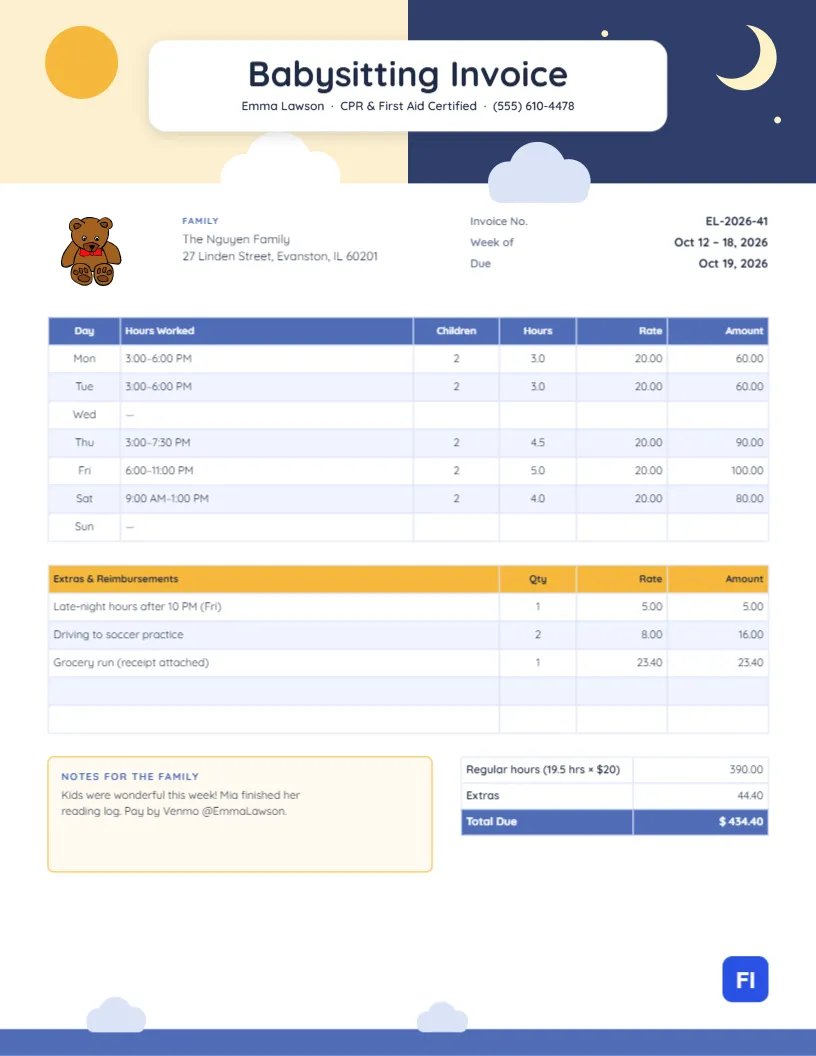
It works for babysitters, part-time and full-time nannies, after-school sitters, mother’s helpers, date-night sitters and nanny shares. The sample shows Emma Lawson, a CPR and first aid certified sitter, invoicing the Nguyen family for a week of care: after-school afternoons, a Friday evening and a Saturday morning, plus late-night hours, driving to soccer practice and a grocery run.
From Sunshine to Starlight
The header is split down the middle. The left half is a soft buttery yellow with a round golden sun; the right half is a deep navy night sky with a crescent moon and scattered stars. Fluffy clouds drift along the bottom edge where the two halves meet, one white and one pale blue. Floating over the center is a white rounded card with Babysitting Invoice in Quicksand and the sitter’s name, certification, and phone below. The picture says Day or night, I’ve got it covered. A small teddy bear with a bow sits beside the family’s name below the header, and a row of pale clouds drifts across the blue footer band.
The family block and invoice number, week, and due date follow. The weekly grid lists each day, Monday to Sunday, with the hours worked, number of children, hours, rate, and amount. A yellow-headed Extras & Reimbursements table sits below it, then a notes box for the family and the totals: regular hours, extras and the total due.
Setting Rates for Different Situations
Rates vary with the number of children, the time of day, and the duties involved. Many sitters use a simple guide like this one; the figures are examples to adjust for your area:
| Situation | Typical Adjustment |
|---|---|
| One child, daytime | Base rate |
| Each additional child | +$2 to $4 per hour |
| After 10 PM | +$3 to $5 per hour, or a flat late fee |
| Driving children to activities | Per trip or mileage |
| Holidays | Time and a half |
The sample uses a $20 base rate for two children, with a $5 late-night charge and $8 per driving trip.
Recording the Week Day by Day
Fill in each day you worked with the times, the number of children, and the hours. Leave days you did not work marked with a dash, as the sample does for Wednesday and Sunday, so the family can see at a glance that the whole week was accounted for. Nineteen and a half hours at $20 gives $390.00 in regular pay.
Extras and Reimbursements
Anything outside regular hours goes in the second table: late-night premiums, driving, meals you bought for the children, activity fees, or supplies. Attach a photo of receipts to the email for reimbursements. In the sample, extras total $44.40, bringing the week to $434.40.
Filling In the Grid and the Extras List
The weekly grid and the extras list are editor tables. Double-click either to type, or use Edit Table Data. The grid has exactly seven rows for the days of the week; the extras table can grow with + Add Row and shrink with – Remove Last. Cells store text, so work out the hours, extras, and total yourself before sending.
Notes Parents Love to Read
The notes box is a small window into the children’s week: a finished reading log, a new word, a great day at the park. It takes thirty seconds to write and makes the invoice feel personal. It is also a good place to mention practical things like We are out of sunscreen or Mia has a dentist appointment next Tuesday.
Changing the Sky and the Bear
The day-and-night header is grouped; recolor the halves, the sun or the moon, or move the clouds. The teddy bear is an editable vector with its own color swatches, and you can swap it for a rattle, a balloon, or a star from the library. The title card is a simple white shape; keep it, since it is what makes the title readable over both halves of the sky.
Paying a Nanny Properly
Regular nannies may be household employees rather than independent contractors, depending on where you live and how many hours they work. In that case, the family may need to handle payroll taxes. This invoice is a clear record of hours either way, but if you are a full-time nanny, it is worth asking the family to check their obligations.
Texting the Invoice to Busy Parents
The page is US Letter, 8.5 by 11 inches. Most sitters text or email the PDF at the end of the week. If the family prefers paper, print it on white paper; the navy night sky prints well on inkjet printers.
Raising Your Rate
Families expect sitters to raise rates as they gain experience, add certifications, or take on more children. Give at least two weeks’ notice, explain the reason in one friendly sentence, and show the new rate from a clear start date on the invoice. A sitter who has recorded every week neatly, with notes about the children, is in a strong position to ask; the invoices themselves show how reliable you have been.
Babysitting Invoice FAQs
Should I invoice weekly or monthly?
Weekly is common for regular sitters. For occasional sitting, send one invoice per job.
How do I bill a nanny share?
Send each family its own invoice, splitting the hours according to your agreement.
What if the parents come home late?
Record the actual end time in the grid and bill the extra time at your usual rate, or your late rate after 10 PM.
Can I add a holiday bonus?
Yes. Add it to the extras table as a line item, such as Holiday bonus.