When what you sell is your time and expertise, the invoice has to explain the work as much as it asks for payment. A client who approved a workshop in March may not remember the details in April, so a good service invoice lists each task, the hours or quantity, and the rate, and puts the total where nobody can miss it. This Plum Service Invoice Template has an elegant layout: a tall plum sidebar holds the key facts, while the main column carries the itemized services, totals, and notes.
Designed for Advisers, Trainers and Other Service Providers
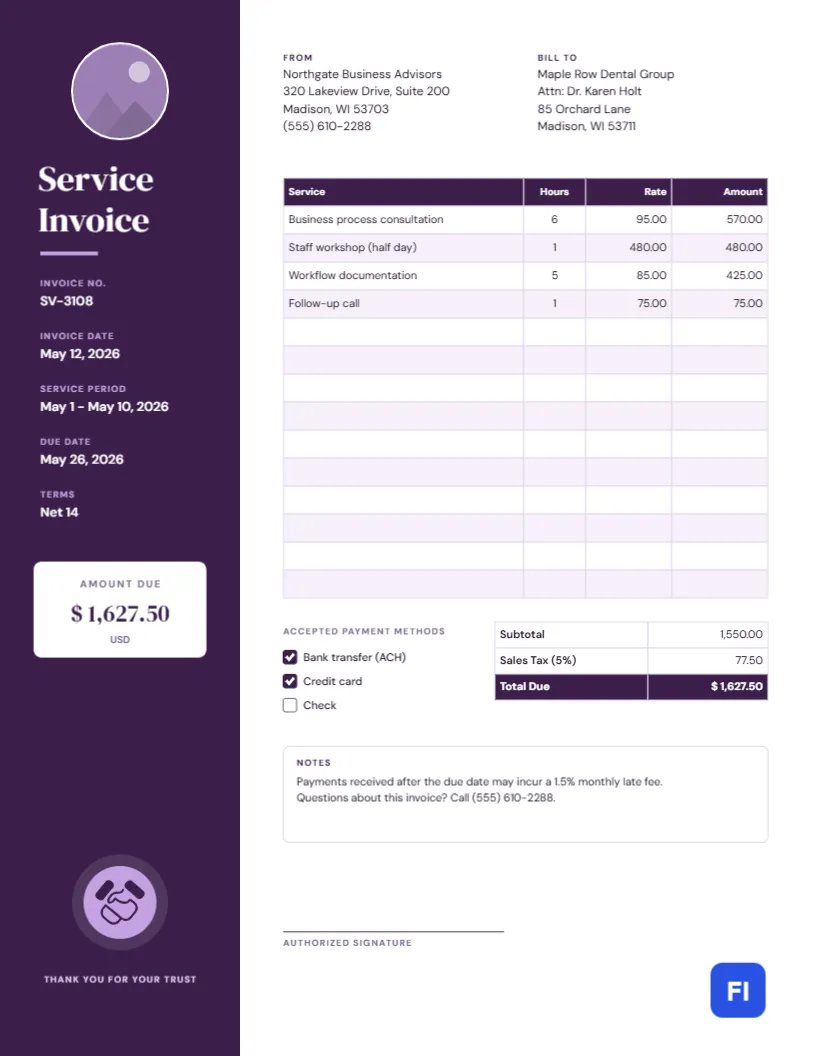
Business advisers, coaches, trainers, virtual assistants, IT support technicians, cleaners, tutors and repair professionals all bill for services rather than goods. The sample shows North-gate Business Advisors invoicing a dental group for process consultation, a staff workshop, workflow documentation and a follow-up call, but the same structure suits almost any hourly or project-based service. If your clients are other businesses, the formal tone of the design helps; if they are households, the clear amount-due panel makes it just as easy for them to understand.
The Sidebar Does the Heavy Lifting
A deep plum column runs down the full height of the left side of the page. At the top is a circular logo slot with a thin white ring, followed by the title Service Invoice in DM Serif Display. Beneath it, the invoice number, invoice date, service period, due date, and terms are stacked with small lilac labels, so the reader finds every reference in one place. Halfway down, a white panel with rounded corners shows AMOUNT DUE in large serif figures above the currency, the number the client will look for first. Near the bottom, a handshake icon in a lilac circle and the words Thank you for your trust close the sidebar.
The white main column carries the From and Bill To addresses side by side, then the services table with a plum header and soft lilac stripes. Under the table, a set of check-boxes lists accepted payment methods (bank transfer, credit card, and check), while the totals table shows the subtotal, sales tax, and total due. A notes box explains late fees and who to call with questions, and an authorized signature line sits at the bottom.
A Short Email to Send With Your Invoice
Most service invoices travel as a PDF attachment. A brief, friendly covering message helps it get paid on time. You can adapt this example:
Hi Karen,
Thank you again for having us at Maple Row this month. Attached is invoice SV-3108 for the process consultation, the staff workshop and the workflow documentation, totalling $1,627.50. Payment is due by May 26 by bank transfer, card or check; the details are on the invoice.
If anything needs clarifying, just reply to this email or call me on (555) 610-2288.
Best regards,
Alex
Mention the invoice number, the amount, and the due date in the email body. Busy clients often approve payments from their inbox without opening the attachment.
Describing Services So They Get Approved
Vague lines like Consulting invite questions. Name the deliverable and, where it helps, the date or scope: Staff workshop (half day), Workflow documentation, 5 hrs, Follow-up call re: scheduling. When you bill hours, round consistently and say how in the notes, for example, to the nearest quarter hour. If a job had a fixed price, show it as one line with a quantity of 1 so the client can compare it with your quote.
Changing the Sidebar Color and Circular Logo
The circle at the top of the sidebar is an image placeholder. Click it and use Replace Image to drop in your logo or a headshot; the round frame keeps its size, so a square image works best. The plum sidebar is a single rectangle, and changing its fill color to navy, forest green, or charcoal transforms the page. The handshake is an editable vector, so you can pick new colors for it from its color swatches or swap it for another icon from the library. If you change the sidebar color, update the table header to match.
Updating the Services Table and Totals
The services list is a proper editor table. Open it with a double-click or Edit Table Data, type in your own services, hours, rates, and amounts, and use + Add Row or – Remove Last to fit the job. Since the cells hold typed values rather than formulas, recalculate each amount, the subtotal, the tax, and the total due whenever you change a figure, and copy the final total into the sidebar’s amount-due panel as well. Checking that those two numbers match is a good last step before sending.
Payment Methods and Late Fees
Tick the boxes for the payment methods you accept and remove the ones you do not. If you charge a late fee, say so on every invoice, not just in your contract; the sample notes a 1.5% monthly fee after the due date. Keep the wording neutral and factual. Most clients who pay late are simply disorganized, and a clear, polite notice is more effective than a stern one.
Paper, Printer, and PDF Notes
The page is US Letter, 8.5 by 11 inches. Because the plum sidebar runs to three edges of the page, exporting a PDF is the cleanest way to deliver it, since the color fills right to the edge on screen. If you print copies for your files, a standard laser or inkjet printer will leave a narrow white border around the sidebar, which is perfectly acceptable for a business document. Use normal-weight copy paper; heavier stock is not needed for invoices.
Answers for First-Time Service Invoices
Should I bill by the hour or by the project?
Either works on this template. List hours and an hourly rate, or enter a quantity of 1 and the project fee.
What goes in the service period field?
The dates the work covered, for example, May 1 – May 10, 2026. It helps clients match the invoice to their records.
Can I leave out the signature line?
Yes. Select it and delete it, or leave it for clients who return a signed copy with payment.