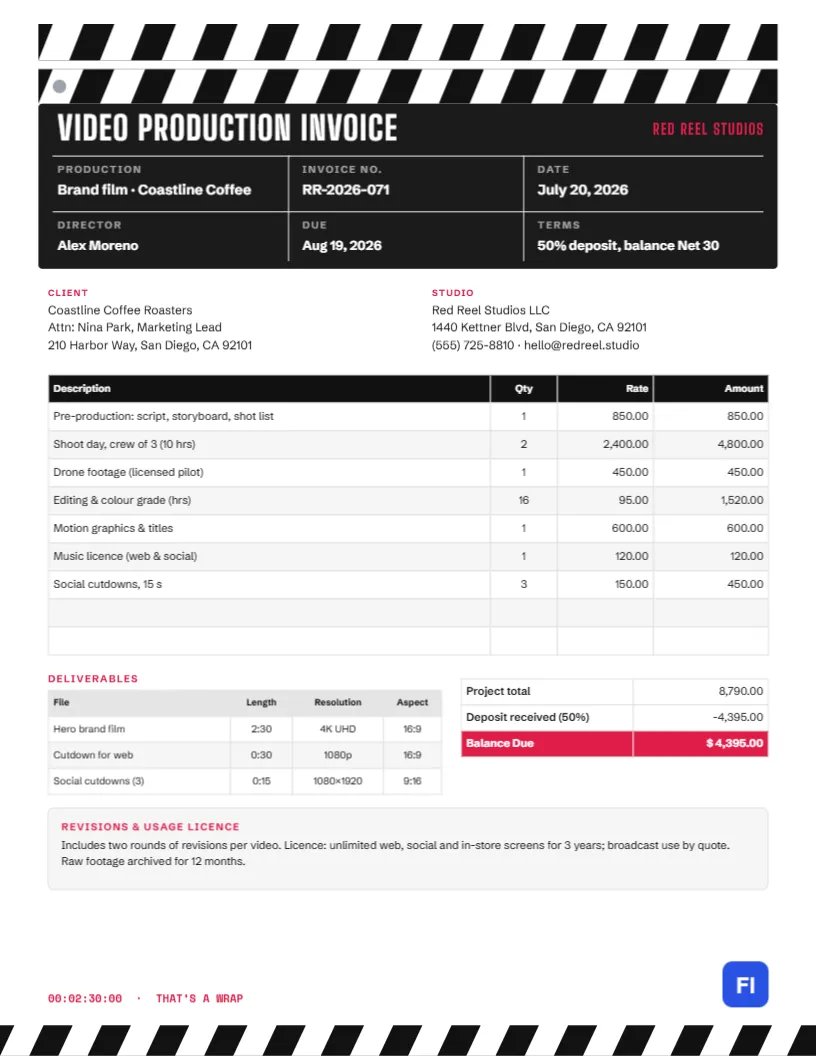
A video project moves through distinct stages: pre-production, shoot days, editing, graphics, music, and final delivery in several formats. Clients approving a production invoice want to see each stage priced, know which files they are getting, and understand how they may use them. This Video Production Invoice Template lays all of that out beneath a header that every filmmaker will recognise: a clapperboard, with its black-and-white striped clapper sticks above a slate filled in with the production, invoice number, date, director, due date, and terms.
Videographers, Production Companies and Content Studios
It suits freelance videographers, video production companies, brand content studios, wedding filmmakers, corporate video teams, drone operators and editors. The sample shows Red Reel Studios invoicing Coastline Coffee Roasters for a brand film: pre-production, two shoot days with a crew of three, drone footage, sixteen hours of editing and colour grading, motion graphics, a music licence and three social cutdowns.
A Clapperboard for a Header
The top of the page is a clapperboard. Two bars of bold diagonal black-and-white stripes stack at the top, with a small grey hinge dot on the left, just like the clapper sticks snapped at the start of a take. Below them, a black slate is divided by thin white lines into fields, the way a real slate is marked for roll, scene, and take. Here the fields hold the production name, invoice number, and date on the first row, and the director, due date, and payment terms on the second. VIDEO PRODUCTION INVOICE runs across the top of the slate in tall white Big Shoulders Display letters, with the studio name in red on the right.
Client and Studio blocks sit under the slate. The line items table follows with a black header. Beneath it, a Deliverables table lists each file with its length, resolution, and aspect ratio, beside the totals. A Revisions & usage licence note spans the page. At the bottom, a red timecode reads 00:02:30:00 · THAT’S A WRAP, and a striped clapper bar runs across the footer.
Deliverable Specs by Platform
Clients increasingly need the same film in several shapes. This cheat sheet covers the most common deliverables; confirm each platform’s current recommendations before you export:
| Use | Aspect ratio | Typical resolution | Typical length |
|---|---|---|---|
| Website hero, YouTube | 16:9 | 1920×1080 or 4K | 1- 3 minutes |
| Instagram and TikTok vertical | 9:16 | 1080×1920 | 15- 60 seconds |
| Feed posts | 1:1 or 4:5 | 1080×1080 or 1080×1350 | 15-30 seconds |
| In-store screens | 16:9 or 9:16 | Match the display | Loop of 15-30 seconds |
Pricing by Production Stage
Breaking the invoice into stages makes a large number easier to approve. The sample prices pre-production as a flat fee, shoot days per day with the crew size stated, drone footage as a flat add-on, editing and colour by the hour, and graphics, music, and cutdowns separately. The project total is $8,790.00; a 50% deposit of $4,395.00 was paid on booking, leaving $4,395.00 due.
Filling In the Slate
The slate fields are ordinary text boxes over the black panel. Click any value to change it: the production name, invoice number, date, director, due date, and terms. Keep values short enough to fit their boxes; long production names can be abbreviated here and written in full in the line items.
Editing Line Items and Deliverables
The line items, deliverables, and totals are editor tables. Double-click to edit or use Edit Table Data, and use + Add Row or – Remove Last to fit the project. The totals do not update themselves, so work out each amount, the deposit and the balance by hand after any change.
Revisions and Usage Licences
Two things cause most disputes in video work: endless revisions and unclear usage rights. The note on the invoice states the number of revision rounds included, how long the client may use the video and where, and how long raw footage is archived. Additional rounds, broadcast use, or longer licences can then be quoted separately, without awkward conversations.
Restyling the Clapperboard
The striped clapper bars are grouped shapes, as is the slate with its dividing lines. Keep them black and white for the classic look and change the red accent to your studio colour, or try a white slate with black lines for a lighter page. The footer stripes can be recoloured to match.
Sending the Final Invoice
This invoice is laid out for letter-size paper. Send the PDF when you deliver the final files, ideally with a link to the download folder and a note of the file names. Clients approving large invoices often forward them to finance, so make sure the client’s billing contact and any purchase order number are in the Client block.
Travel, Gear Rental and Talent
Bigger productions add costs beyond the crew: travel days, gear rental, location fees, actors and voice-over artists. List these as separate lines so the client can see what the budget paid for. For talent, note the usage agreed with the performer, since their fees often depend on how long and where the video will be shown.
Deposits, Kill Fees and Postponed Shoots
Productions depend on weather, locations and people turning up, and shoots are sometimes postponed. Take a booking deposit, as the sample does, and set out in your contract what happens if the client cancels or reschedules at short notice: a kill fee for work already done, or a rescheduling fee for crew and gear held for the day. If a fee applies, invoice it as its own line.
Archiving and Handing Over Files
After delivery, clients sometimes ask for a new cut months later. Archiving project files and raw footage for a set period, twelve months in the sample, makes that possible and can be billed as a separate service after the period ends. Deliver final files through a download link that stays active for a reasonable time, and note the expiry date in your delivery email.
Video Production FAQs
Can I use this for wedding films?
Yes. Change the production name to the couple’s names and list coverage hours, highlight film, and full ceremony edit.
How do I bill extra revision rounds?
Add a line such as Additional revision round with your hourly or flat rate.
Should raw footage be included?
Only if agreed. Many studios charge a separate fee for handing over raw footage.