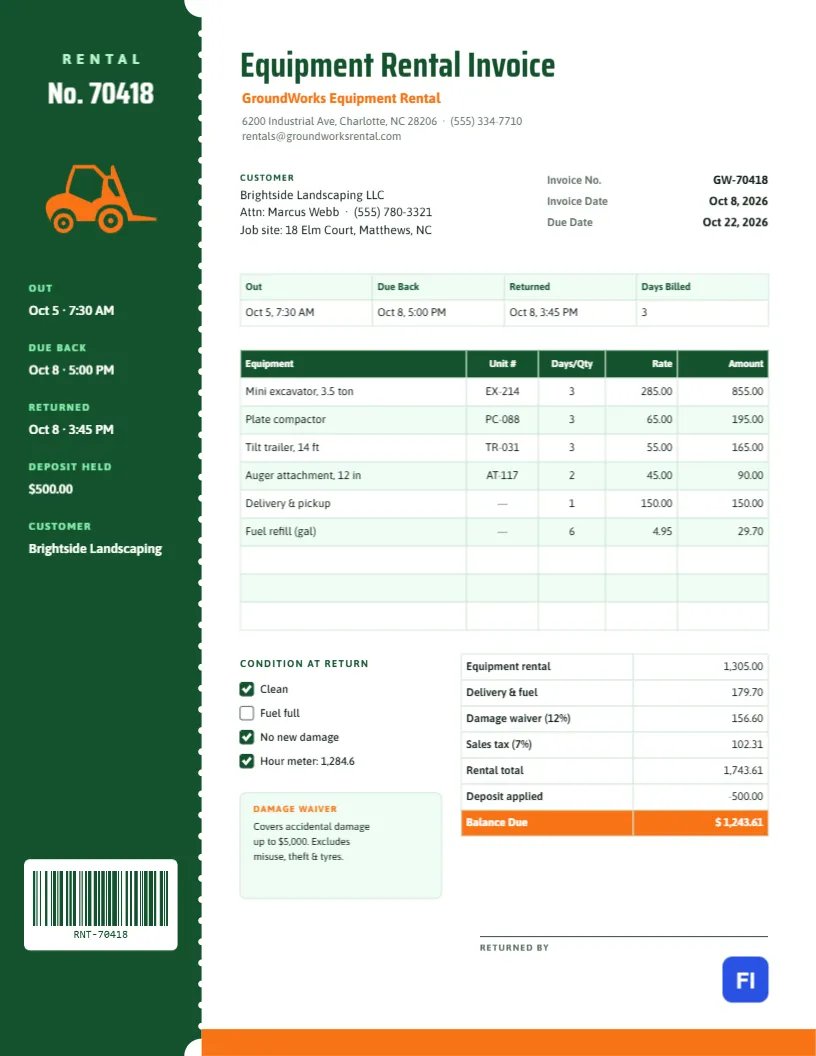
Renting out equipment is a business of dates and times. When did the machine go out, when was it due back, when did it actually come back, and in what condition? Every one of those answers affects the bill. This Equipment Rental Invoice Template is built around them, with a tall tear-off stub down the left side that works like the tag on a rental counter, and a main section that turns the rental period, the units, and the extras into a clear total.
Tool Hire, Heavy Equipment and Party Rental Companies
It suits construction and heavy equipment rental yards, tool hire shops, landscaping equipment rental, trailer and lift rentals, party and event rental companies, and hardware stores with a rental counter. The sample shows GroundWorks Equipment Rental billing a landscaping company for a three-day rental of a mini excavator, a plate compactor, a tilt trailer, and an auger attachment, with delivery and pickup and a fuel refill.
A Rental Tag You Could Tear Off
A deep green stub runs the full height of the page on the left, separated from the invoice by a line of white perforation holes, with half-circle notches at the top and bottom where it would tear. The stub carries RENTAL and the rental number in large white Saira Condensed letters, an orange forklift, and five labelled values: when the equipment went out, when it was due back, when it was returned, the deposit held, and the customer. At the bottom of the stub, a white tile holds a scannable barcode of the rental number.
On the white side, Equipment Rental Invoice is set in green with the company name in orange and the address, phone, and email beneath. The customer and job site block sits beside the invoice number and dates. A strip records out, due back, returned, and days billed. The equipment table lists each item with its unit number, days or quantity, rate, and amount. Beneath it, a Condition at return checklist and a damage waiver note sit beside a detailed totals table, with a Returned by signature line and an orange band at the foot of the page.
Rental Periods and How They Are Billed
Rental companies bill by blocks of time, and customers are often unsure how a few extra hours will be charged. A clear rate card prevents arguments:
| Rental Period | Typical Billing | Example (Mini Excavator) |
|---|---|---|
| Half day (up to 4 hours) | About 70% of the day rate | $200 |
| Day (24 hours) | Day rate | $285 |
| Week (7 days) | About 3-4 × the day rate | $990 |
| Month (28 days) | About 3 × the week rate | $2,850 |
| Late return | Next block, after any grace period | Extra day after 1 hour late |
The sample was returned before the due time, so three days were billed.
Unit Numbers and the Condition Check
Recording the unit number of each machine, such as EX-214 for the excavator, links the invoice to your fleet records, service history, and any damage claim. The condition checklist records what you found on return: cleanliness, fuel level, new damage, and the hour meter reading. In the sample, the fuel was not full, which is why a fuel refill appears as a charge.
Damage Waiver, Tax and the Deposit
Most rental companies offer a damage waiver, a percentage of the rental that limits the customer’s liability for accidental damage. The sample charges 12% of the equipment rental. The totals then add delivery and fuel, the waiver, and 7% sales tax on the rental and waiver, for a rental total of $1,743.61. The $500 deposit held at checkout is applied, leaving $1,243.61 to pay.
Editing the Stub and the Tables
The stub’s values are ordinary text, so click and type the new rental number, times, and deposit. The barcode on the stub is a real barcode object: click it and the QR/Barcode panel opens with its value, where you can type the new rental number. The period strip, equipment list, and totals are editor tables; double-click them or use Edit Table Data, with + Add Row and – Remove Last for more or fewer items. Cells hold text, not formulas, so recalculate the amounts and totals yourself.
Changing the Stub Colour and Icon
The green stub and its perforations are grouped, so they recolour together. Yellow, red or navy stubs suit other rental brands. The forklift is an editable vector: swap it for an excavator, a scissor lift, a tent or a chair from the library to match what you rent most. The orange accents appear in the company name, the icon, the balance row, and the footer band.
Printing at the Rental Counter
The layout fits standard US Letter paper. Print one copy at checkout for the customer to sign, and the final invoice at return. Staff can tear off the stub along the perforation line and hang it on the equipment or file it with the keys. The green stub is solid colour, so a laser printer gives the best result.
Delivery Tickets and Job Sites
When equipment is delivered to a job site, the driver’s delivery ticket and the invoice should agree. Put the job site address in the customer block, note delivery and pickup times on the stub or in the strip, and charge delivery as its own line. Contractors often need the job name or purchase order number to allocate the cost, so add it to the customer block.
Long-Term Rentals and Monthly Billing
Machines kept on site for months are usually billed every 28 days rather than at the end of the hire. Issue a new invoice for each period with the same rental number on the stub and the period dates in the strip, and mark the final invoice with the return date and condition check. Contractors appreciate predictable monthly invoices that match their project accounting.
Equipment Rental FAQs
Can I use this for party rentals?
Yes. List tents, tables, and chairs in the equipment table and replace the unit number column with quantity.
How do I charge for damage found at return?
Add a line describing the damage and the repair cost, and note whether the damage waiver covers it.
Is the barcode required?
No, but it lets staff scan the rental number at the counter. Delete it if you do not use scanners.