Every business, no matter how small, eventually needs to ask a customer for money in writing. A plain, well-organized invoice does that job better than an email or a text message: it records what you sold, when payment is due and where the money should go, and it gives your client a document their bookkeeper can file. This simple business invoice template is built for exactly that everyday task. It works for a studio, a shop, a consultant, a side business or any company that bills for products and services, and it looks polished enough that you will be happy to send it under your own name.
Who Should Start With This General-Purpose Layout
If you are not sure which invoice style fits your work, begin here. The layout does not assume a trade, so it suits a graphic designer billing a café for a menu, a bookkeeper charging a monthly fee, a caterer invoicing a corporate lunch or an online seller sending a wholesale order. The sample shows Brightline Studio LLC billing Harbor & Pine Café for a spring menu refresh, but every word can be replaced. Because the page carries only the essentials, it is also a good choice for your very first invoice, before you know what extra fields your customers expect.
A Tour of the Indigo and Amber Page
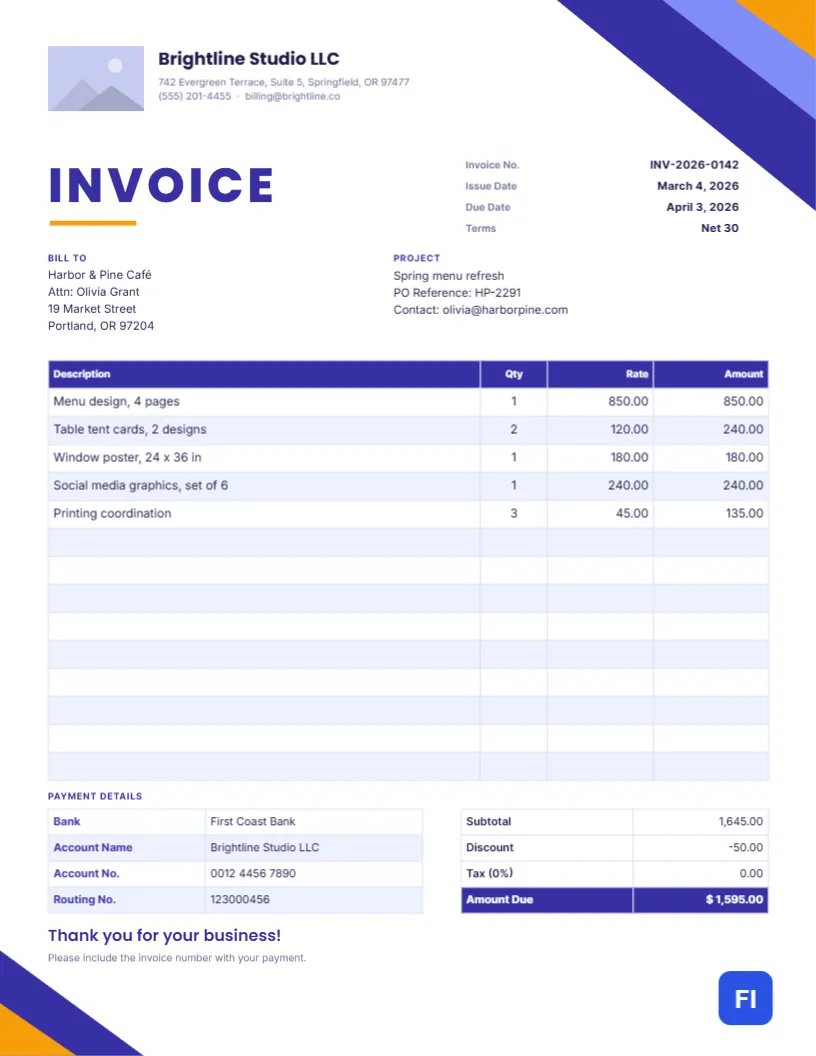
The design is built on strong geometry rather than decoration. In the top-right corner, three stacked triangles in deep indigo, bright violet and amber slice across the page, and a smaller echo of the same shapes sits in the bottom-left corner, so the header and footer feel connected. Near the top left is a rectangular logo slot next to your company name in Poppins, with the address, phone number and email in small Inter text underneath.
Below that, the word INVOICE is set in large, widely spaced indigo capitals with a short amber underline, the single element that tells the reader what the document is at a glance. To its right, four neat rows list the invoice number, issue date, due date and payment terms, with the values aligned to the right edge. Two blocks follow: Bill To on the left and Project on the right, where you can add a purchase order reference or the client contact.
The heart of the page is a fourteen-row items table with an indigo header and pale lavender striping. At the bottom, a payment details table lists the bank, account name, account number and routing number, while a totals box on the right shows the subtotal, discount, tax and a highlighted Amount Due. A friendly “Thank you for your business!” line closes the page, along with a reminder to quote the invoice number when paying.
Numbers, Dates and Terms: Filling In the Header
Give every invoice a unique number and never reuse one. Many small businesses use the year followed by a running count, as in the sample’s INV-2026-0142, which keeps the list sortable and makes it obvious when a number is missing. The issue date is the day you send the invoice. The due date should match the terms you agreed with the client: Net 30 means payment is due thirty days after the issue date, Net 15 means fifteen, and “Due on receipt” means immediately.
The Terms row is worth filling in even when the due date already says it all, because accounts payable departments often sort bills by terms. If you offer an early-payment discount, such as 2/10 Net 30 (two percent off if paid within ten days), write it here so the client sees it before they schedule the payment.
Before You Hit Send: A Quick Checklist
Most invoice delays come from small omissions. Run through this list before you export the PDF.
| Check | Why it matters |
|---|---|
| Client’s legal name and billing address | Larger companies reject invoices addressed to the wrong entity. |
| Purchase order or reference number | Many clients cannot pay without matching a PO. |
| Unique invoice number | Prevents double payments and makes follow-up easy. |
| Clear item descriptions | “Menu design, 4 pages” is approved faster than “Design work”. |
| Totals re-added by hand | The table stores typed text, so it will not recalculate for you. |
| Bank or payment details | A missing routing number turns into a week of emails. |
Making the Items Table Your Own
The items list is a real table object, not a collection of loose boxes, so editing it is quick. Double-click it (or use the green Edit Table Data button in the side panel) and you can type straight into each cell. Use + Add Row when you have more lines than the sample, or − Remove Last to shorten it. Column widths, header colour, stripe colours and fonts are all adjustable from the table options, and if you keep your price list in a spreadsheet, Import CSV can bring the rows in for you.
One important point: the cells hold plain text, not spreadsheet formulas. When you change a quantity or a rate, work out the new line amount and update the subtotal, discount, tax and Amount Due yourself. A calculator or a quick spreadsheet alongside is the safest way to keep every figure consistent.
Swapping In Your Logo and Colours
The small rectangle beside the company name is a logo placeholder. Select it and choose Replace Image to upload your own logo; the frame keeps its size and position, so the header stays tidy. A horizontal logo works best in this shape. If your brand uses different colours, select the corner triangles and change their fill; switching indigo for forest green or charcoal, for example, instantly makes the page feel like yours. Remember to update the INVOICE heading and the table header to the same colour so the page stays consistent.
Discounts, Tax and the Amount Due Box
The totals box shows a discount line and a tax line. If you do not collect sales tax, leave the rate at 0% or delete the row from the table so it does not confuse the client. When you do charge tax, state the rate in the label, for example “Tax (8.25%)”, because clients and their accountants want to see how the figure was reached. Keep the Amount Due row as the last, highlighted line; it is the one number the reader is looking for.
Print and PDF Advice for a Letter-Size Invoice
The template is sized at 8.5 x 11 inches, standard US Letter. Most invoices today are sent as PDFs, and downloading a PDF from the editor keeps the text sharp and the colours accurate. If you also mail paper copies, print on bright white 24 lb paper; the indigo corner triangles run to the page edge, so either choose a printer that handles borderless printing or accept a thin white margin, which still looks clean. For an archive copy, save the PDF with the invoice number in the file name.
Keeping a Paper Trail Your Accountant Will Thank You For
Store every invoice you send in one folder, named consistently, and note the date each one is paid. At tax time you will have a complete record of income, and if a client ever disputes a charge, you can produce the original document in seconds. Duplicating this template for each new invoice, rather than overwriting the last one, keeps that history intact.
Common Questions About This Business Invoice
Can I use this template if I sell products instead of services?
Yes. Rename the columns to Item, Quantity, Unit Price and Amount, and list each product on its own row.
What if I am not registered for sales tax?
Remove the tax row or leave it at zero. Only charge tax you are registered to collect.
How many line items fit on the page?
Fourteen rows are ready to fill, and you can add more with + Add Row as long as the table still clears the payment details at the bottom.
Can I change the fonts?
Yes. Select any text and choose another Google Font from the font list; Poppins and Inter are simply the defaults.