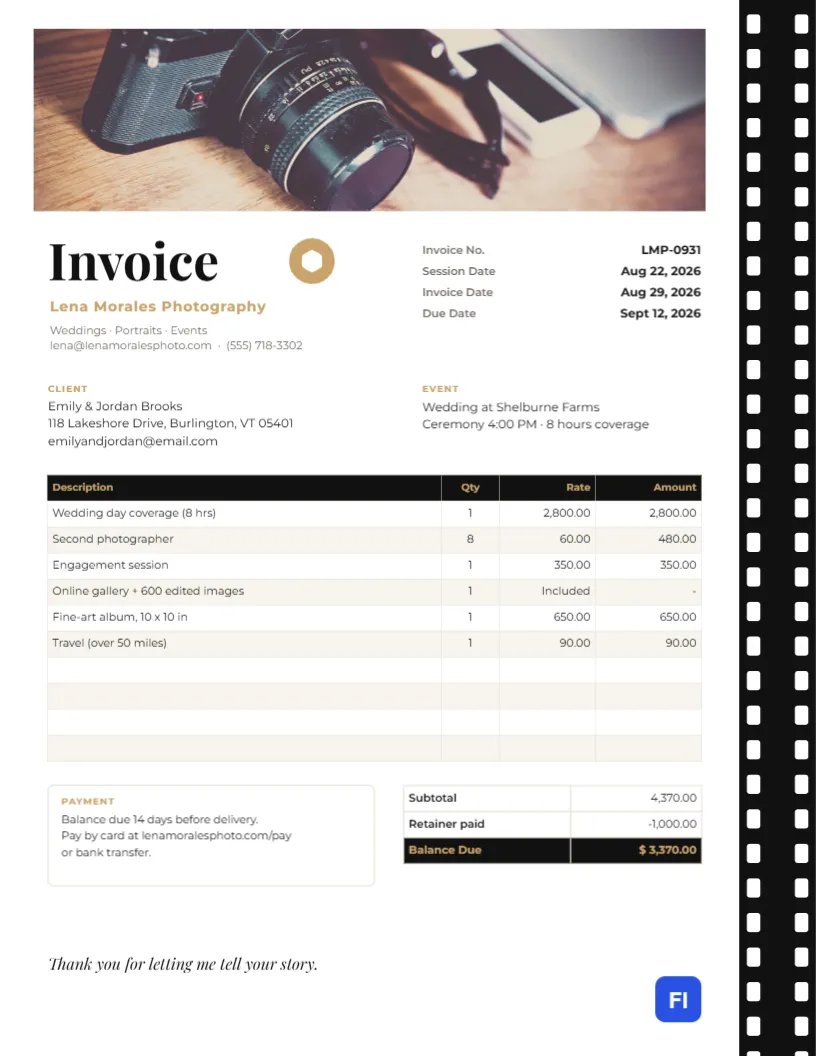
For a photographer, every document you send is part of your portfolio. Couples and portrait clients who hired you for your eye will notice if the invoice looks like it came from an accounting program. This Photography Invoice Template turns the top third of the page into a gallery: a wide photo banner for one of your favorite images, with an elegant black-and-gold design beneath that handles the business side.
Weddings, Portraits, Events and Commercial Shoots
The template suits wedding photographers, portrait and family photographers, newborn and boudoir studios, event and corporate photographers, and videographers. The sample shows Lena Morales Photography billing Emily and Jordan Brooks for eight hours of wedding coverage, a second photographer, an engagement session, an online gallery with six hundred edited images, a ten-inch fine-art album, and travel.
The Look: Hero Banner, Film Strip, Gold Aperture
Across the top of the page, a wide photo slot fills most of the width. Place a single striking image there: a couple silhouetted at sunset, a detail of the rings, a portrait with beautiful light. Down the right edge of the page runs a black film strip with white sprocket holes, the classic symbol of photography. Under the banner, Invoice is set in large black Playfair Display beside a gold aperture icon, with the studio name in spaced gold capitals and your specialties and contact details underneath.
The invoice number, session date, invoice date, and due date sit to the right of the title. Below, the Client and Event blocks name the couple and the wedding details. The items table uses a black header on a warm cream-tinted stripe. A Payment note sits beside the totals, where the retainer already paid is subtracted to show a black-and-gold Balance Due. An italic line, Thank you for letting me tell your story, closes the page.
A Typical Wedding Photography Payment Timeline
Most photographers split payment across the months between booking and delivery. This timeline is common; adjust it to your contract and send one invoice at each stage.
| Stage | When | Typical amount |
|---|---|---|
| Retainer | At booking, to hold the date | 25-50% of the package |
| Mid-payment (optional) | After the engagement session | 25% |
| Balance | 14-30 days before the wedding or before delivery | The remainder |
| Add-ons | When ordered | Albums, prints, extra hours |
The sample invoice is the balance invoice: it lists the full package and subtracts the retainer.
Choosing the Banner Photograph
Select the banner and use Replace Image to upload your photo. The slot keeps its wide proportions, so a landscape image works best; the editor fills the frame without stretching. For a wedding client, many photographers use an image from the couple’s own engagement session, which makes the invoice feel personal and gives the couple a sneak peek. For commercial clients, pick a strong image from a similar job. Avoid busy pictures with important details near the edges; the banner is cropped to its shape.
Listing Coverage, Deliverables and Extras
Name each part of your package the way it appears in your contract: coverage hours, second shooter, engagement session, gallery and image count, album size, and travel. If something is included at no charge, like the online gallery in the sample, list it anyway with Included or 0.00 in the amount column; clients like to see everything they are getting.
Updating the Table and the Balance
The package list is a real table object. Double-click it or press Edit Table Data to edit the lines, and use + Add Row or – Remove Last to change their number. Cells hold plain text, not live sums, so after editing, recalculate the subtotal, subtract the retainer, and update the Balance Due. Double-check it against your contract total before sending.
Changing Gold to Your Signature Color
The gold is used for the aperture icon, the studio name, labels, and the Balance Due text. If your brand is blush, sage or silver, change those elements together. The aperture is an editable vector with its own color swatch. The film strip is a group of shapes; recolor the black to charcoal or navy if you prefer a softer frame, but keep the sprocket holes white.
Printing for a Client Keepsake Box
The page is US Letter, 8.5 x 11 inches. For most clients, a PDF is ideal. If you deliver albums or prints in a box, you might include a printed invoice or receipt: use a bright white matte or satin paper of around 32 lb (120 gm) so the banner photo prints richly. Check that your printer can reproduce the black film strip without banding.
Usage Rights and Licensing on Commercial Jobs
When you photograph for a business, the invoice should say what the client may do with the images. Add a line such as Usage license: web and social, 2 years with its fee, or note the license terms in the payment box. It prevents misunderstandings when a client later wants to use a photo on a billboard, and it records the agreement for both sides.
Delivery Dates and Gallery Access
Clients are eager to see their photos, so use the payment note or an extra row to state when the gallery will be delivered and how long it stays online. Gallery delivered within 6 weeks; online for 12 months answers two questions before they are asked. If you release images only after the balance is paid, say so plainly and kindly; it is a common and accepted policy.
Photography Invoice FAQs
Can I use a photo of myself in the banner?
You can, but most clients respond better to an image of their own session or your best work.
Should I charge sales tax on photography?
Some states tax prints and albums but not digital files or services. Check your local rules and add a tax line if needed.
Can I use the same template for a mini session?
Yes. Replace the wedding lines with the session fee and any print or digital packages the client ordered.
What if the client wants to pay in installments?
Add a row for each payment received above the Balance Due, with the date in the description.