Electrical work is regulated, inspected, and often permitted, and your invoice should reflect that. Commercial clients want to see the permit number and inspection status; homeowners want to know their new circuits are safe and warrantied. This Navy Circuits Electrician Invoice Template gives you a professional, trade-specific layout with fields for both, wrapped in a design that is instantly recognizable as electrical.
For Licensed Electricians and Electrical Contractors
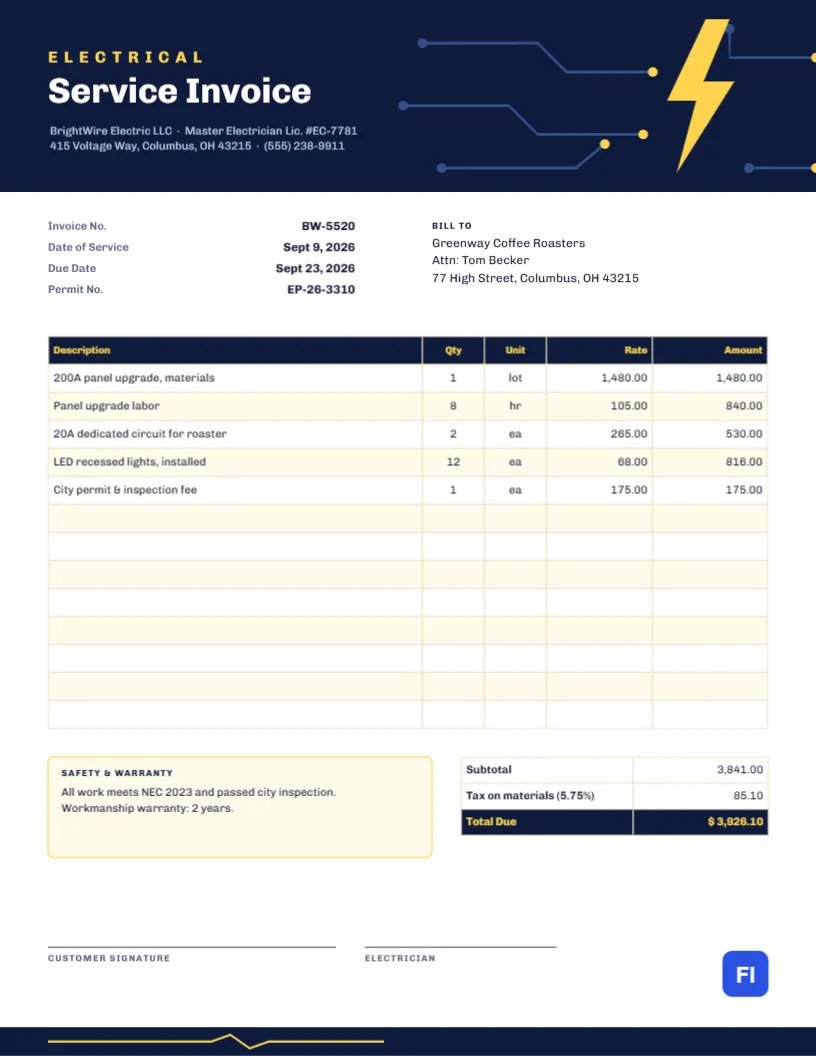
The template suits residential and commercial electricians, electrical contractors, solar and EV charger installers, lighting specialists, and maintenance electricians. The sample shows BrightWire Electric LLC billing Greenway Coffee Roasters for a 200-amp panel upgrade, panel labor, two dedicated 20-amp circuits for a coffee roaster, twelve LED recessed lights, and the city permit and inspection fee.
Circuit Traces That Lead to a Lightning Bolt
A deep navy band fills the top of the page. On its right side, thin blue circuit traces run horizontally and step diagonally, like the copper paths on a printed circuit board, each ending in a small yellow dot. They lead toward a large yellow lightning bolt, the single bold symbol of the design. On the left, the word ELECTRICAL is set in widely spaced yellow Chivo capitals above Service Invoice” in large white type, followed by the company name, master electrician license number, and address.
Below the header, the invoice number, date of service, due date, and permit number line up on the left, and the Bill To block sits on the right. The items table has five columns, Description, Qty, Unit, Rate, and Amount, with a navy header and soft yellow striping. A Safety & Warranty box with a yellow outline sits beside the totals, and the page closes with a customer signature line and an electrician signature line above a thin navy footer.
Permit, Inspection and Code Details: A Field Guide
Electrical invoices are often reviewed by landlords, insurers, and inspectors as well as the customer. Filling in these details every time saves questions later:
- Permit number. Enter the municipal permit number in the header facts. If no permit was required, write Not required rather than leaving it blank.
- Permit fee. List the fee you paid the city as its own line so the customer sees it is a pass-through cost.
- Inspection result. Note in the Safety & Warranty box whether the work passed inspection, and the date if you have it.
- Code edition. Mention the code the work meets, such as NEC 2023, which reassures commercial clients and insurers.
- Workmanship warranty. State the length, for example, two years, and what it covers.
Using the Unit Column
Electrical work mixes lots, hours, and individual devices, so the table includes a Unit column. Use lot for a bundle of materials like a panel kit, hr for labor, ea for fixtures and devices, and ft for wire or conduit runs if you bill by length. It makes the quantity meaningful at a glance: 12 ea recessed lights is instantly clear.
Editing Line Items and Totals
The items list is an editor table, so you can double-click it to type into the cells or open Edit Table Data from the side panel. Add or remove rows with + Add Row and – Remove Last. Remember that the cells hold text, not calculations: when you change a quantity or rate, recalculate the line amount and update the subtotal, the tax on materials, and the total due by hand. The sample taxes materials only at 5.75%; set the rate and base that apply where you work.
Recoloring the Bolt and Circuit Board
The circuit traces and lightning bolt are grouped, so they move and scale together. If your brand uses orange or electric blue instead of yellow, change the bolt, the trace end dots, the ELECTRICAL label, and the warranty box outline together. The navy header can become black or dark green just as easily. Keep strong contrast between the bolt and the background; the design depends on that flash of color.
Commercial Clients and Purchase Orders
Businesses like the coffee roaster in the sample often issue a purchase order before work starts. Add the PO number under the Bill To address or as an extra row in the header facts. If the job was split across a quote and change orders, list each change order as its own line so it matches the paperwork on the client’s side.
Ink, Paper and PDF for the Navy Header
The page is US Letter, 8.5 by 11 inches. Download a PDF for email; the yellow and navy look crisp on screens. For printed copies, use a laser printer or an inkjet on standard quality. The navy header uses a lot of ink, so if you print many copies for your own records, consider printing those in greyscale; the layout stays readable.
Pricing Small Jobs Versus Big Installs
Short service calls, like replacing a breaker or adding an outlet, are usually easiest to bill as a flat rate that includes the trip, the first hour, and common parts. Larger installs such as panel upgrades, EV chargers, or full rewires are better itemized, because the customer will compare the invoice with your written estimate line by line. Whichever approach you use, keep the descriptions consistent with your quote, so the words the customer approved are the same words they see on the bill.
Signatures on Completion
The two signature lines let both you and the customer sign when the job is finished. For panel upgrades and new circuits, a signed invoice is useful evidence that the customer accepted the work after it passed inspection. If you complete the job remotely or the client is off-site, sign your line and note Customer notified by email in the warranty box.
Electrician Invoice FAQs
Can I use this template for service calls without a permit?
Yes. Write Not required in the Permit No. field and remove the permit fee line.
How do I bill for an apprentice?
Add a separate labor line such as Apprentice labor with its own hours and rate.
Is the lightning bolt a picture?
No, it is a vector shape, so it stays sharp at any size, and you can change its color directly.