Construction billing has its own rules. Materials and labor are taxed differently in many states; owners often hold back a percentage until the job is signed off, and every invoice needs to tie back to a job name, a site address, and usually a permit. A one-table invoice cannot show all of that clearly. This Construction Contractor Invoice Template can: it separates materials from labor, carries the job details in their own strip, and includes a retainage line, all under a header that looks like it belongs on a job site.
Made for General Contractors and Remodelers
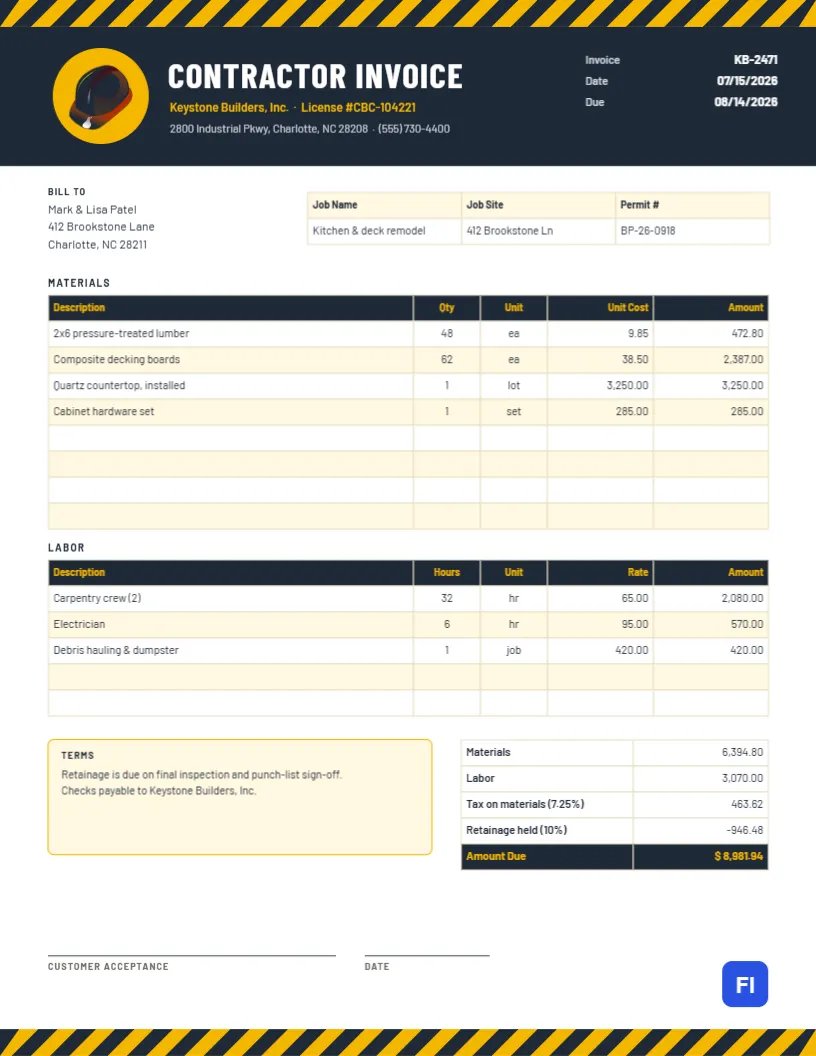
The template fits general contractors, remodeling companies, deck and fence builders, roofers, concrete and masonry crews, cabinet installers, and handymen who take on larger projects. The sample shows Keystone Builders, Inc. billing homeowners Mark and Lisa Patel for a kitchen and deck remodel, with pressure-treated lumber, composite decking, a quartz countertop, and cabinet hardware on the materials side, and a carpentry crew, an electrician, and debris hauling on the labor side.
Hazard Stripes, Hard Hat and Charcoal Header
A band of black-and-yellow hazard stripes runs across the very top of the page, the pattern you see on barriers and heavy equipment. Beneath it, a charcoal header holds a yellow circle with a hard hat icon, the title CONTRACTOR INVOICE in tall Barlow Condensed capitals, and the company name and license number in yellow. The invoice number and the issue and due dates sit on the right of the header in white. The same hazard stripes return as a footer, so the page is framed top and bottom like a site entrance.
In the body, the Bill To block sits on the left, and a pale yellow strip on the right lists the job name, job site address, and permit number. Then come two tables, one titled Materials and one titled Labor, each with a charcoal header and yellow column names. Under them, a Terms box explains when retainage is released, and the totals table shows materials, labor, tax on materials, retainage held, and a highlighted Amount Due. Two lines at the bottom collect the customer’s acceptance signature and the date.
Why Materials and Labor Belong in Separate Tables
Homeowners and lenders both want to see what went into the job. Listing materials with quantity, unit, and unit cost shows that you charged fairly for lumber and fixtures. Listing labor by trade with hours and rate shows how long the work took. In many US states, sales tax applies to materials but not to labor, and splitting them makes the tax line easy to calculate and easy to defend. If your state treats construction differently, adjust the label and the tax base to match your accountant’s advice.
Retainage, Explained With the Sample Numbers
Retainage (sometimes called retention) is a portion of each payment that the owner holds back until the work passes final inspection. It protects the owner if punch-list items are left unfinished. Ten percent is common on residential remodels; five percent is common on larger commercial jobs. Here is how the sample invoice works it out:
| Line | Calculation | Amount |
|---|---|---|
| Materials | Lumber, decking, countertop, hardware | $6,394.80 |
| Labor | Carpentry, electrician, hauling | $3,070.00 |
| Tax on materials | 7.25% × $6,394.80 | $463.62 |
| Retainage held | 10% × ($6,394.80 + $3,070.00) | $946.48 |
| Amount due now | Materials + labor + tax – retain-age | $8,981.94 |
When the job passes inspection, send a separate retainage invoice for the amount held, referencing this invoice number. Keep a running total of retainage across progress invoices so neither side loses track.
Filling In the Job Strip and Permit Number
The yellow strip beside the client address is where the invoice connects to the physical job. Use a job name the homeowner recognizes, such as Kitchen & deck remodel, the full site address (which may differ from the billing address for rental properties), and the building permit number if one was pulled. Lenders financing a renovation often ask for the permit number before releasing a draw.
Editing the Materials and Labor Tables
Both tables are genuine editor tables. Double-click either one to type into its cells, or select it and press Edit Table Data. Add lines with + Add Row and trim with – Remove Last. The Unit column accepts whatever makes sense: ea, lot, set, sq ft, linear ft, hr, or job. The tables store text rather than formulas, so after you change a quantity or price, multiply it out yourself and update the materials and labor totals, the tax, the retainage, and the amount due. Many contractors keep a small spreadsheet for each job and copy the final figures into the invoice.
Adapting the Design to Your Company
The hard hat is an editable vector icon inside a yellow circle. You can recolor it from its color swatches or replace it with another tool icon from the library, such as a hammer or a saw. If your company colors are red and gray rather than yellow and charcoal, change the stripe groups, header, and table headers together. The hazard stripes are grouped, so each band moves and recolors as one object.
Progress Billing on Long Jobs
On jobs that run for weeks, bill in stages instead of waiting until the end. Duplicate this invoice for each draw, list the work completed since the last one, and add a line such as Less previous payments above the amount due. Tie each draw to a milestone the owner can see, like framing complete or cabinets installed, so approval is quick.
Printing for the Job File
The page is US Letter, 8.5 by 11 inches. Email a PDF to the owner and print a copy for the job binder. A laser printer handles the black-and-yellow stripes cleanly; on an inkjet, choose standard rather than draft quality so the yellow stays bright. Have the customer sign the acceptance line on the final invoice when you walk the finished job together.
Contractor Billing Questions
Do I have to hold retainage?
Only if your contract says so. If it does not, delete the retainage row and the note about release.
Can I show change orders?
Yes. Add rows labeled Change order #1 and so on, with their approved amounts, to the relevant table.
Where should my license number go?
It already sits in the header under the company name. Many states require it on every invoice, so keep it there.