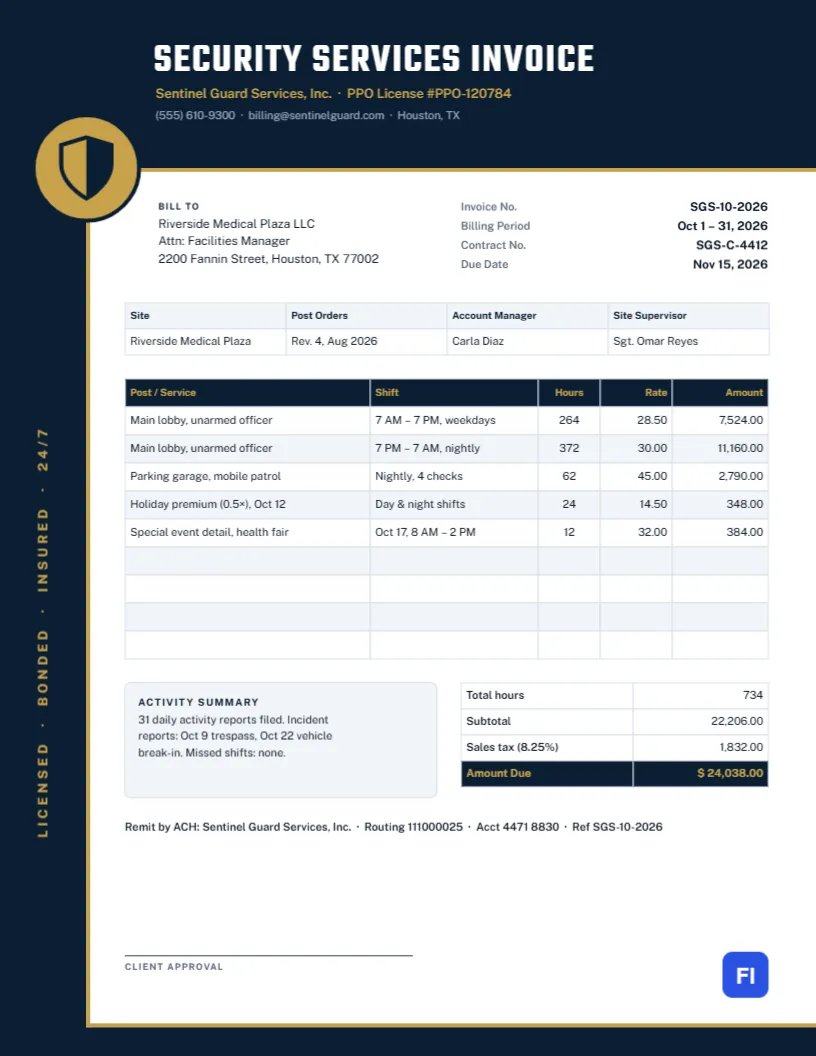
Security contracts are billed by the hour, often thousands of hours a month across several posts, shifts, and special events. Facility managers approving those invoices want to see each post, each shift pattern, the hours worked and the rate, together with evidence that the coverage was delivered. This Security Guard Services Invoice Template gives them exactly that, in a disciplined navy-and-gold layout built around a shield medallion.
Guard Companies, Patrol Services and Event Security
It suits contract security companies, mobile patrol services, event security providers, loss prevention contractors, concierge and front-desk security, and independent licensed officers billing a client. The sample shows Sentinel Guard Services billing a medical plaza in Houston for October: day and night lobby officers, a nightly mobile patrol of the parking garage, a holiday premium for Columbus Day, and a special event detail at a health fair.
A Navy Frame and a Gold Shield
The page is framed on three sides like a bracket: a deep navy band across the top, a navy rail down the left edge and a navy band along the bottom, with a fine gold line tracing the inside edge of the frame. Where the top band meets the rail sits a gold medallion with a navy shield, the emblem of the design. Running up the left rail in spaced gold capitals are the words LICENSED · BONDED · INSURED · 24/7. SECURITY SERVICES INVOICE is set across the top in tall white Teko letters, with the company name and license number in gold and the contact line in gray.
Inside the frame, the Bill To block sits beside the invoice number, billing period, contract number, and due date. A site strip lists the site, post orders revision, account manager and site supervisor. The main table breaks the month down by post and shift, with hours, rate and amount. An activity summary sits beside the totals, which show total hours, subtotal, sales tax and the amount due, and a line of remittance details and a client approval signature complete the page.
Types of Billable Hours
Security contracts usually recognize several kinds of hours at different rates. Showing each on its own line prevents questions from the client’s accounts team:
| Hour type | Typical rate | When it applies |
|---|---|---|
| Regular | Contract rate per post | Scheduled coverage |
| Night or weekend | Slightly higher contract rate | If the contract prices shift differently |
| Holiday premium | 0.5× to 1× extra | Named holidays in the contract |
| Overtime or short notice | 1.5× the contract rate | Extra coverage requested with little notice |
| Special event | Event rate | One-off details such as fairs or openings |
734 Hours, Tax, and the Amount Due
The five lines cover 734 hours. Day lobby coverage (264 hours at $28.50), night lobby coverage (372 hours at $30.00), the garage patrol (62 hours at $45.00), the holiday premium, and the event detail total $22,206.00. Texas taxes security services, so 8.25% sales tax adds $1,832.00, for an amount due of $24,038.00. Check whether security services are taxable where your client’s site is.
The Activity Summary
Clients pay more willingly when they can see what the coverage achieved. The activity summary records the number of daily activity reports filed, the incidents reported with their dates, and any missed shifts. Detailed reports belong in your reporting portal, but a summary on the invoice reminds the facility manager of the value of the service.
Editing the Shift Table
The site strip, the shift table, and the totals are editable tables. Double-click to edit them, or use Edit Table Data with + Add Row and – Remove Last for more posts or special details. If your scheduling software exports hours as CSV, Import CSV can fill the table. Because the table holds plain text, multiply hours by rate for each line and update the total hours and amounts yourself.
Customizing the Frame and Medallion
The navy frame and its gold lines are grouped into one object. Recolor it to black and silver or dark green and gold to match your uniforms. The shield in the medallion is an editable vector; swap it for a badge, a padlock or your own emblem. The vertical credentials text on the rail is ordinary text, so it can list your own licenses or slogan.
Contract Numbers and Post Orders
Facility managers match invoices to contracts and purchase orders, so keep the contract number in the header facts and the post orders revision in the site strip. When the post orders change, for example, after adding a patrol, note the new revision so the client can see why hours increased.
Printing and Approval
This invoice is formatted for 8.5 x 11 inch paper. Most security invoices are emailed as a PDF with a time sheet summary attached. For clients who approve on paper, the approval line at the bottom collects a signature. The navy frame is heavy, so print approval copies on a laser printer.
Multiple Sites Under One Contract
Property managers often hire one security company for several buildings. You can bill each site on its own invoice, with the site strip changed each time, or combine them on one invoice by adding the site name to each row in the Post/Service column and subtitling in your email. Ask the client which they prefer; many want separate invoices so each building’s costs can be charged to the right budget.
Rate Increases and Contract Renewals
Guard wages rise with minimum wage changes and market demand, and most contracts allow the rate to be reviewed each year. Give the client written notice before the new rate takes effect, and show the old and new rates on the first invoice after the change, with a note referencing the contract clause. A transparent increase is much easier to approve than a quiet change in the numbers.
Security Invoice FAQs
Can I bill weekly instead of monthly?
Yes. Change the billing period and list the week’s hours by post.
How do I show a guard’s name?
Add the officer’s name or badge number to the Post/Service description, if the client requires it.
Should I include incident details?
Keep details in the incident reports; the invoice should summarize only dates and types.