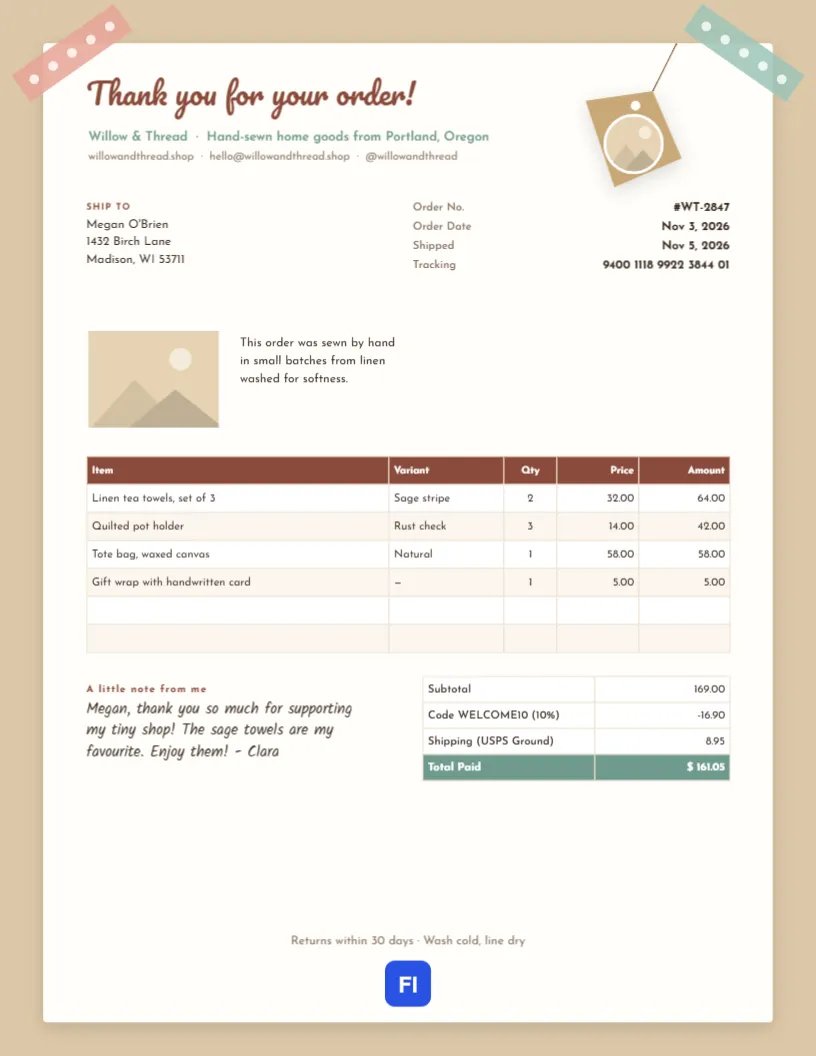
When someone buys from a small handmade shop, the parcel is part of the experience. Customers remember the tissue paper, the sticker, the little note, and they notice when the paperwork inside the box feels personal instead of printed from a warehouse system. This Handmade Online Shop Order Invoice looks like it was put together on a crafting table: a white card taped to craft paper with patterned washi tape, a twine gift tag carrying your logo, and a handwritten thank-you from the maker.
For Makers, Etsy Sellers and Small Online Shops
It suits Etsy and marketplace sellers, makers with their own online shop, craft fair vendors taking online orders, candle, soap and jewellery makers, sewists, potters, printmakers and anyone who ships handmade goods. The sample shows Willow & Thread, a home goods shop in Portland, invoicing a customer for linen tea towels, quilted pot holders, a waxed canvas tote and gift wrap.
Washi Tape, Kraft Paper and a Twine Tag
The whole page is a warm kraft brown, like a paper shopping bag. A white card sits on top with a soft shadow, held at its top corners by two strips of washi tape, one pink and one mint, each dotted with white spots. From the top edge, a piece of twine leads to a tilted brown gift tag with a punched hole and a round logo slot. Thank you for your order! is written in Pacifico across the top of the card, with the shop name, what you make, and your website, email, and social handle beneath.
The Ship To block and the order number, order date, ship date, and tracking number follow. Beside a product photo slot, a short line tells the story of how the items were made. The item table lists each product with its variant, quantity, price, and amount. A handwritten note from the maker sits beside the totals, and a line about returns and care runs along the bottom of the card.
Adding Your Logo and Product Photo
There are two photo placeholders. The round slot on the gift tag is for your shop logo; the rectangular slot beside the story line is for a photo of the products in the order, or your best-selling item. Select either one and choose Replace Image to upload your picture; the frames keep their size and white borders. A real product photo makes the invoice feel like a small catalogue page, and customers often keep it.
Variants, Discounts and Shipping
Handmade products come in colours, sizes and scents, so the table has a Variant column, which prevents mix-ups when a customer orders the same item in two colours. The sample’s items come to $169.00; a 10% welcome code takes off $16.90, and USPS Ground shipping adds $8.95, for a total of $161.05. If you charge sales tax, add a line above the total.
Packing Slip or Invoice?
Many small shops use one document for both. Include the prices when the buyer is the recipient, as here. When an order is a gift shipped directly to someone else, remove the price columns and totals to turn it into a packing slip, and email the priced invoice to the buyer instead.
Writing the Handwritten Note
The note is set in Kalam, a font that looks like real handwriting. A good note is short, personal, and specific: thank the customer by name, mention something about the items they chose, and sign with your first name. If you sew or make by hand, a line about your process or materials reinforces why they bought from you rather than a big store.
Updating the Item Table
The item list and totals are editor tables. Double-click them or use Edit Table Data to type your products, and change the number of rows with + Add Row and – Remove Last. If your shop platform exports orders as CSV, Import CSV can bring in the products. Amounts are typed, so work out each line, the discount, and the total yourself.
Tracking Numbers and Shipping Times
Customers want to know where their parcel is. Put the tracking number in the header facts, as the sample does, and include the carrier in the shipping line. For made-to-order items, add the expected ship date in the story line, so customers know the wait is part of the handmade process.
Returns, Exchanges and Care
The line at the bottom of the card states your return window and care instructions. Keep it short and friendly. If personalised items can’t be returned, say so here and on your listing, so the policy never comes as a surprise.
Changing the Tape and Colours
Each strip of washi tape is a small group that can be recoloured or rotated. Try gold with white dots for a holiday season, or match the tape to your packaging. The kraft background is the page colour and can become white, pale pink, or sage. The Pacifico title, the rust item header, and the mint total row are easy to switch to your brand colours.
Printing the Invoice for the Parcel
The design fits a US Letter page. Print it on your home printer, fold it in thirds with the thank-you facing up, and tuck it on top of the items so it’s the first thing the customer sees. If you want to save ink, change the page background to white; the taped card look still works.
Turning Buyers Into Repeat Customers
The invoice is a small marketing opportunity. Add a line inviting customers to share a photo and tag you, or a code for 10% off their next order. Handmade shops grow through word of mouth, and a friendly note inside the box is often what prompts a review or a second order.
Handmade Shop Invoice FAQs
Can I use this for craft fair or wholesale orders?
For craft fairs, use it as a receipt. For wholesale orders to shops, add case quantities and your wholesale terms.
Should I include my home address?
No. A website and email are enough; many makers use a PO box for returns.
Can I change the handwriting font?
Yes. Select the note and choose another handwriting font, such as Caveat or Patrick Hand, from the font list.