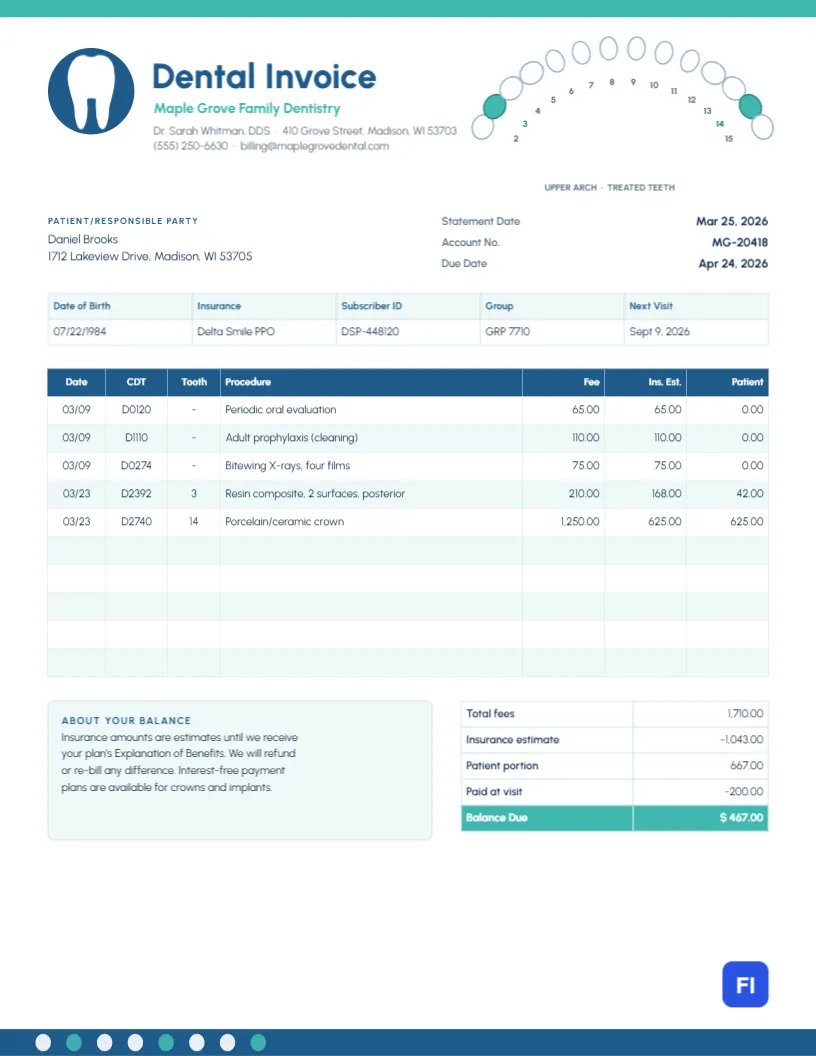
Dental bills confuse patients more than almost any other. A single visit can include an exam, a cleaning, X-rays, and a filling, each with its own code, fee, and insurance coverage, and a crown may cost hundreds of dollars even after insurance. A clear dental invoice shows each procedure, which tooth it was on, what insurance is expected to pay, and what the patient owes. This Dental Invoice Template adds a small tooth chart so the patient can see exactly which teeth were treated.
Dental Practices, Specialists and Hygiene Clinics
It suits general and family dental practices, pediatric dentists, orthodontists, periodontists, oral surgeons, dental hygiene clinics and dental billing services. The sample shows Maple Grove Family Dentistry invoicing a patient for a periodic exam, an adult cleaning and bite wing X-rays on one date, and a two-surface composite filling on tooth 3 and a porcelain crown on tooth 14 two weeks later.
A Tooth Chart at the Top of the Page
A thin mint stripe runs along the very top of the page. In the top-right corner, fourteen teeth of the upper arch, numbers 2 to 15, are drawn as white ovals in a curve, molars slightly wider than the front teeth, each with its number inside the arch. The two treated teeth, 3 and 14, are filled in mint so they stand out, and a small caption reads UPPER ARCH · TREATED TEETH. On the left, a blue circle holds a white tooth, beside Dental Invoice in bold blue Urbanest, the practice name in mint, and the dentist, address, and contact details.
The patient block and the statement date, account number, and due date come next. A strip records the date of birth, insurance plan, subscriber ID, group number, and the next visit. The procedures table has seven columns: date, CDT code, tooth, procedure, fee, insurance estimate, and patient portion. A note explaining the balance sits beside the totals, and a blue footer band carries a row of small white and mint tooth shapes.
What the Codes and Coverage Mean
Most dental plans cover procedures in three tiers. This table uses the sample’s procedures to show how coverage typically works; the patient’s own plan may differ:
| Code | Procedure | Typical tier | Plan usually pays |
|---|---|---|---|
| D0120 | Periodic oral evaluation | Preventive | 100% |
| D1110 | Adult cleaning | Preventive | 100% |
| D0274 | Bitewing X-rays, four films | Preventive/diagnostic | 100% |
| D2392 | Two-surface composite filling | Basic | 80% |
| D2740 | Porcelain crown | Major | 50% |
That is why the sample patient owes nothing for the first visit, $42 for the filling, and $625 for the crown.
How the Balance Is Calculated
Total fees for the two visits are $1,710.00. The insurance estimate is $1,043.00, leaving a patient portion of $667.00. The patient paid $200.00 at the visit, so the balance due is $467.00. Because insurance amounts are estimates until the plan processes the claim, the note explains that any difference will be refunded or billed once the Explanation of Benefits arrives.
Updating the Tooth Chart
The teeth are grouped, and each one is a simple oval. To mark different treated teeth, select the group, then click the tooth you want and change its fill to mint; change the previous ones back to white. The numbers are separate text, so they stay put. For lower-arch treatment, relabel the numbers 18 to 31 and change the caption to LOWER ARCH.
Editing Procedures and Totals
The patient strip, procedures table, and totals are editor tables. Double-click them or open Edit Table Data, adding procedures with + Add Row and trimming with – Remove Last. The cells are plain text, so calculate each patient portion and the totals by hand, and check them against the practice management software before sending.
Privacy on Patient Statements
Dental statements may be opened by family members, so include only what billing requires: procedures, codes, teeth, and amounts. Leave clinical notes and medical history off the invoice, and send electronic statements through a secure channel where your privacy obligations require it.
Branding the Practice
The tooth in the blue circle is an editable vector that can be recolored from its swatch or swapped for your practice logo. Blue and mint are calm, clinical colors; teal and coral or navy and soft gold suit a boutique practice. Recolor the top stripe, the Balance Due row, and the footer to match.
Printing and Mailing
This statement fits letter-size paper and a standard window envelope when folded in thirds. Most practices now send statements by email or through a patient portal, but some patients prefer paper. The small tooth chart prints clearly in color and remains readable in grayscale.
Payment Plans for Major Work
Crowns, implants and orthodontic treatment can leave patients with large balances. Offering interest-free payment plans, as the note mentions, keeps treatment accessible and payments predictable. Put the agreed monthly amount and the number of payments on a short plan agreement, and show each payment received as a line on later statements.
Recall Visits and Treatment Plans
The Next Visit field in the patient strip is a gentle reminder of the six-month recall that keeps teeth healthy. When a patient has further treatment planned, such as a second crown or a deep cleaning, mention it in the note with an estimated cost. Patients plan better, and insurance benefits can be timed across plan years to reduce what they pay out of pocket.
Missed Appointments and Cancellation Fees
Missed appointments cost a practice valuable chair time. If your policy includes a fee for late cancellations or no-shows, list it as a separate line with the date, and make sure the policy was shared with the patient in advance. Many practices waive the first occurrence as a courtesy and note that on the statement.
Dental Invoice FAQs
Can I use this for patients without insurance?
Yes. Remove the insurance columns, or set them to zero, and apply any membership plan discount instead.
Where do I show a family’s combined balance?
Add each family member’s procedures with their name in the procedure column, and total them together.
What does “Ins. Est.” mean?
It is the practice’s estimate of what insurance will pay, based on the plan’s coverage.