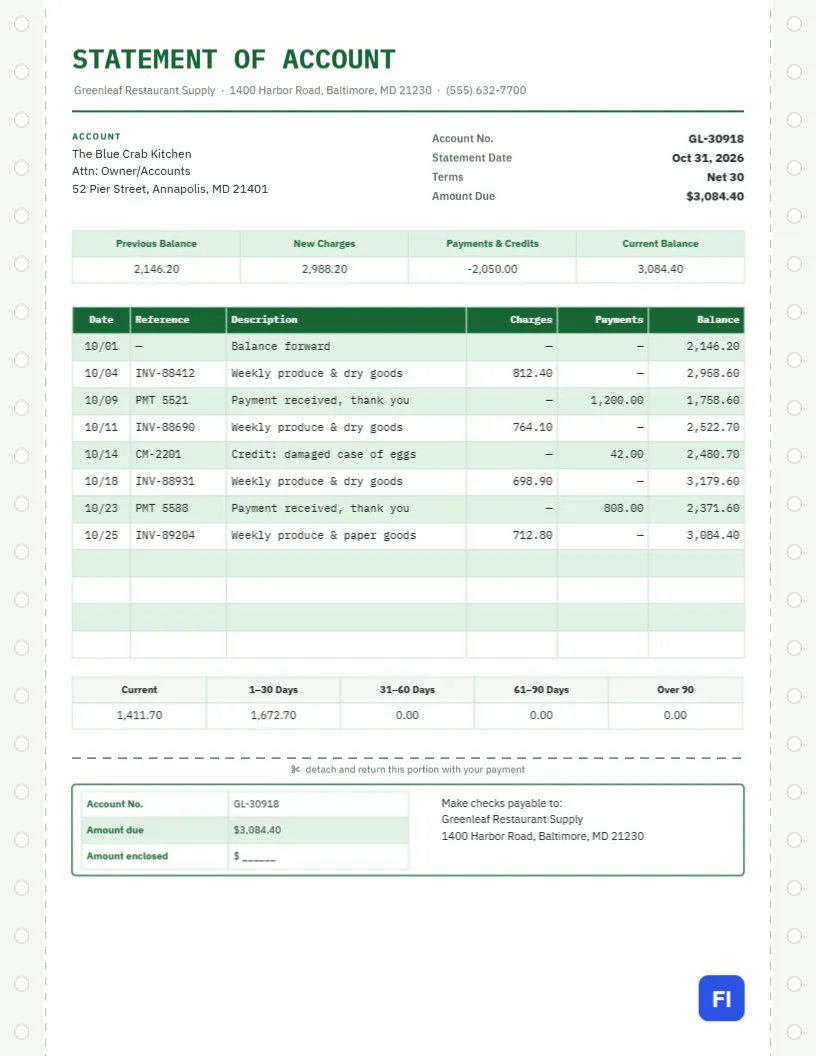
Customers who buy on account receive many invoices, payments and credits each month, and it is easy for both sides to lose track. A statement of account brings everything together: the balance carried forward, every invoice, payment and credit in date order, a running balance and how much of it is overdue. This Statement of Account Template presents it on paper styled like the green-bar computer forms that accounts departments used for decades, complete with tractor-feed holes, and a tear-off remittance slip at the bottom.
Statement or Invoice: What Is the Difference?
An invoice asks for payment for one sale. A statement summarises an account over a period, usually a month, and asks for payment of the balance. Customers usually pay from the statement, not from each invoice. This statement template is for businesses with regular trade customers: wholesalers and food suppliers, building merchants, printers, repair shops with fleet accounts, landscapers with commercial clients and any business that gives credit terms.
Green Bar Paper and Tractor Holes
Down both edges of the page run pale grey tractor-feed strips punched with round holes, each strip separated from the page by a dashed perforation line, just like continuous-form paper fed through an old line printer. STATEMENT OF ACCOUNT is set in green IBM Plex Mono, a typewriter-style font, with the supplier’s address beneath and a green rule underneath. The transaction ledger alternates pale green and white rows, the classic green bar that made long printouts easier to read.
The account block sits beside the account number, statement date, terms, and amount due. An account summary strip shows the previous balance, new charges, payments and credits, and the current balance. The ledger follows, then an aging strip and, after a dashed cut line, a remittance slip with the account number, amount due, an amount enclosed space, and the payment address.
Reading the Running Balance
The ledger lists every transaction in date order with a running balance, so the customer can match each line with their own records. In the sample, the restaurant started October owing $2,146.20. Four weekly deliveries added $2,988.20, two payments reduced the balance by $2,008.00, and a credit for a damaged case of eggs took off $42.00. The October balance is $3,084.40. When the customer’s records disagree, the running balance shows exactly where the difference begins.
What the Aging Buckets Tell You
The aging strip splits the balance by how long each invoice has been unpaid. It helps both sides prioritise:
| Bucket | Sample amount | What it means |
|---|---|---|
| Current | $1,411.70 | Invoices not yet due under Net 30 terms |
| 1- 30 days | $1,672.70 | Slightly overdue; usually a timing issue |
| 31-60 days | $0.00 | Worth a phone call |
| 61-90 days | $0.00 | Formal reminder and possibly credit hold |
| Over 90 | $0.00 | Serious collection risk |
The Tear-Off Remittance Slip
Customers who pay by cheque return the bottom slip with their payment. It tells your accounts team which account the money belongs to and how much the customer intended to pay, which is invaluable when a payment doesn’t match the balance. The slip repeats the account number and amount due and leaves space for the amount enclosed.
Editing the Ledger
The summary strip, ledger, aging strip, and remittance box are editor tables. Double-click to type in them or open Edit Table Data; + Add Row and – Remove Last change the number of transactions. Most accounting software can export a customer’s transactions for the month as CSV, which Import CSV can place straight into the ledger. The running balance column is typed text, so check that it ends on the same figure as the summary strip.
Sending Statements Every Month
Send statements on the same day each month, soon after month-end. Regular statements catch missing invoices and unapplied payments early, before they become arguments. Many customers pay only from statements, so a statement that arrives late means cash arrives late too.
When a Customer Disputes a Line
Ask for the reference number of the disputed line and compare it with your delivery notes and payment records. Credits for damaged or missing goods, like the egg credit in the sample, should appear as their own lines with a credit memo number, so nobody wonders whether they were applied.
Restyling the Green Bar
The tractor strips and perforations form one group; delete it if you want a cleaner, modern look, or keep it for the nostalgic, very readable style. The alternating row colours are set in the table options, so you can switch the green bars to blue or grey to match your brand.
Mailing Statements With Return Envelopes
The statement is sized for US Letter paper. Email it as a PDF for most customers and post a printed copy with a return envelope to those who pay by cheque. Print at standard quality; the pale green bars are light enough not to waste ink.
Unapplied Payments and Missing Invoices
Two problems come up again and again on trade accounts. The first is a payment received without a clear reference, which sits unapplied while invoices look overdue. The second is an invoice the customer never received, so it never gets paid. A monthly statement exposes both: the customer sees an invoice they don’t recognise and asks for a copy, and your team sees a payment that needs to be matched. Resolve them straight away, before the next month adds more lines.
Credit Limits and Account Holds
Statements are also the moment to check each customer against their credit limit. If the balance is above the limit, or the aging shows amounts over 60 days, many suppliers pause new orders until a payment arrives. Mention it politely on the statement or in the covering email, so the customer knows why an order may be held and can arrange payment in time.
Statement of Account FAQs
Should I include paid invoices?
Include every transaction in the period, including payments, so the running balance makes sense.
Can I add finance charges?
Only if your terms allow them. Add them as a dated line in the ledger with a clear description.
What if the balance is zero?
Many businesses still send a statement so the customer has a complete record for the month.