In trucking, getting paid depends on paperwork. Brokers and shippers match every invoice against a rate confirmation, a signed bill of lading, and sometimes a lumper receipt, and anything that does not match goes to the bottom of the pile. A clear freight invoice with the right reference numbers in the right places is the fastest way to get your money, whether you factor your loads or wait for quick pay. This Trucking & Freight Invoice Template is built for exactly that.
Owner-Operators, Small Fleets and Carriers
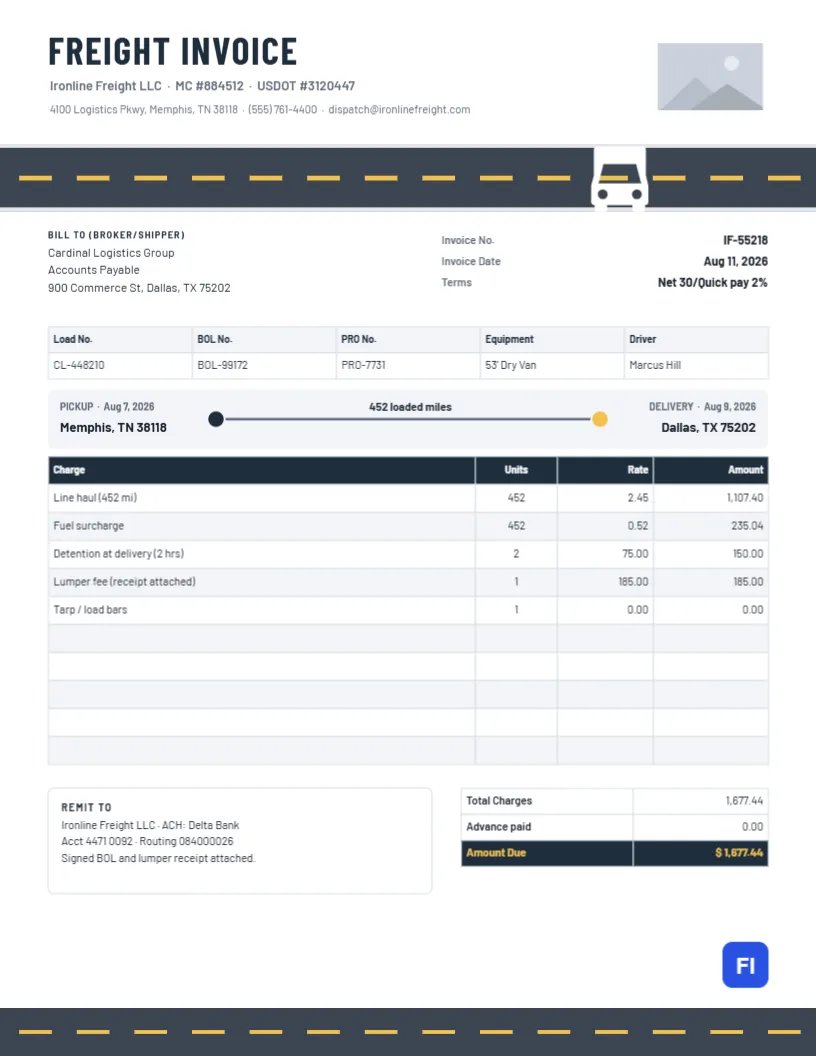
The layout suits owner-operators, small trucking companies, hotshot carriers, box truck and cargo van operators, and dispatch services billing on behalf of carriers. The sample shows Ironline Freight LLC invoicing Cardinal Logistics Group, a broker, for a dry van load from Memphis to Dallas: 452 miles of line haul, a fuel surcharge, two hours of detention at delivery, and a lumper fee.
A Stretch of Highway at the Top
The header opens with FREIGHT INVOICE in bold navy Barlow Condensed, with the company name, MC number, and USDOT number underneath and the address, phone, and dispatch email below that. A rectangular logo slot sits on the right. Under the header runs a band of dark asphalt with white edge lines and a dashed yellow centre line, and a white truck drives along it. The same road runs across the foot of the page, so the invoice starts and ends on the highway.
The Bill To block for the broker or shipper sits beside the invoice number, invoice date, and terms. A five-column strip holds the load number, BOL number, PRO number, equipment, and driver. Beneath it, a route card shows pickup and delivery cities and dates at either end of a dotted line, with the loaded miles in the middle. The charges table, a Remit To box with ACH details, and a totals table with a yellow Amount Due complete the page.
Matching the Invoice to the Rate Confirmation
Brokers approve invoices by comparing them with the rate confirmation they sent you. Make sure these fields match exactly:
| Rate Confirmation Says | Put It on the Invoice As |
|---|---|
| Load or order number | Load No. in the strip |
| Shipper and consignee cities | Pickup and Delivery on the route card |
| Line haul rate | Line haul row (flat or per mile) |
| Fuel surcharge terms | Fuel surcharge row |
| Accessorials (detention, lumper, TONU) | A separate row each, with receipts |
| Payment terms | Terms in the header facts |
Attach the signed BOL and any receipts to the same email or upload, in one PDF if possible.
Accessorial Charges That Get Paid
Detention, layover, lumper fees, driver assist, tarping, and truck-order-not-used (TONU) charges are often disputed. They get paid when they were approved on the rate confirmation and are documented. Record arrival and departure times on the BOL for detention, attach the lumper receipt, and describe each charge plainly: Detention at delivery (2 hrs) or Lumper fee (receipt attached).
Filling In the Route Card
The route card shows pickup on the left and delivery on the right, with dates and the loaded miles in the middle. Edit the cities, dates, and mileage for each load. For multi-stop loads, list each stop in the charges table or in the notes; the card works best for the first pickup and final delivery.
Editing Charges and Totals
The load strip, the charges table, and the totals are editor tables. Double-click to edit or open Edit Table Data, and add or remove lines with + Add Row and – Remove Last. The cells hold text, so calculate miles times rate, add accessorials, and enter the total yourself. Check the total against the rate confirmation before sending.
Quick Pay, Factoring and Remit-To Details
Many brokers offer quick pay for a small fee, shown in the sample as Net 30/Quick pay 2%. If you factor your invoices, the Remit To box must show your factoring company’s details and the notice of assignment, not your own bank. Getting this wrong can mean the broker pays the wrong party, and recovering that money is slow.
Branding the Road and Truck
The road bands are grouped, so you can recolour the asphalt or the centre line in one step. The truck is an editable vector: recolour it or replace it with a box truck, a flatbed or a van from the library to match your equipment. Replace the logo placeholder with your company logo using Replace Image.
Paper, PDF and Load Packets
The page is US Letter, 8.5 x 11 inches. Almost all freight billing is now electronic, so download the PDF and combine it with the BOL scan. If you drop paperwork at a factoring office, print on plain paper; the road bands print cleanly on a laser printer.
Keeping Records for IFTA and Taxes
Each invoice records miles, dates, and routes, which helps with fuel tax reporting and bookkeeping. Keep invoices in order by load number and date, with the BOL and rate confirmation for each. At the end of the quarter, the miles you billed give a quick cross-check against your logbook.
Invoicing Shippers Directly
When you haul for a shipper without a broker in between, there is no rate confirmation to match, so your invoice carries more weight. Put the shipper’s purchase order or reference number in the load strip, describe the commodity and weight in the charges table, and agree your payment terms in writing before the first load. Direct shippers are often slower to pay than brokers with quick-pay programs, so send the invoice the same day the load is delivered and follow up a few days before the due date.
Freight Invoice FAQs
Can I bill a flat rate instead of per mile?
Yes. Enter the line haul as one unit at the flat amount.
What is a PRO number?
A carrier’s tracking number for the shipment. If you do not use one, delete that column.
Do I need the MC and DOT numbers on the invoice?
Brokers use them to confirm who they are paying, so it is good practice to keep them in the header.