A handyman’s day can include a leaky faucet, a hole in the drywall, three shelves, and a sticking door, all in the same house. Billing that as one lump sum leaves customers guessing; billing it task by task, with hours and materials for each, makes the value obvious. This Handyman Invoice Template is set up that way, with a Materials column next to Labor for every task, under a header that looks like the pegboard wall of a well-organized workshop.
Handymen, Home Repair Pros and Property Maintenance
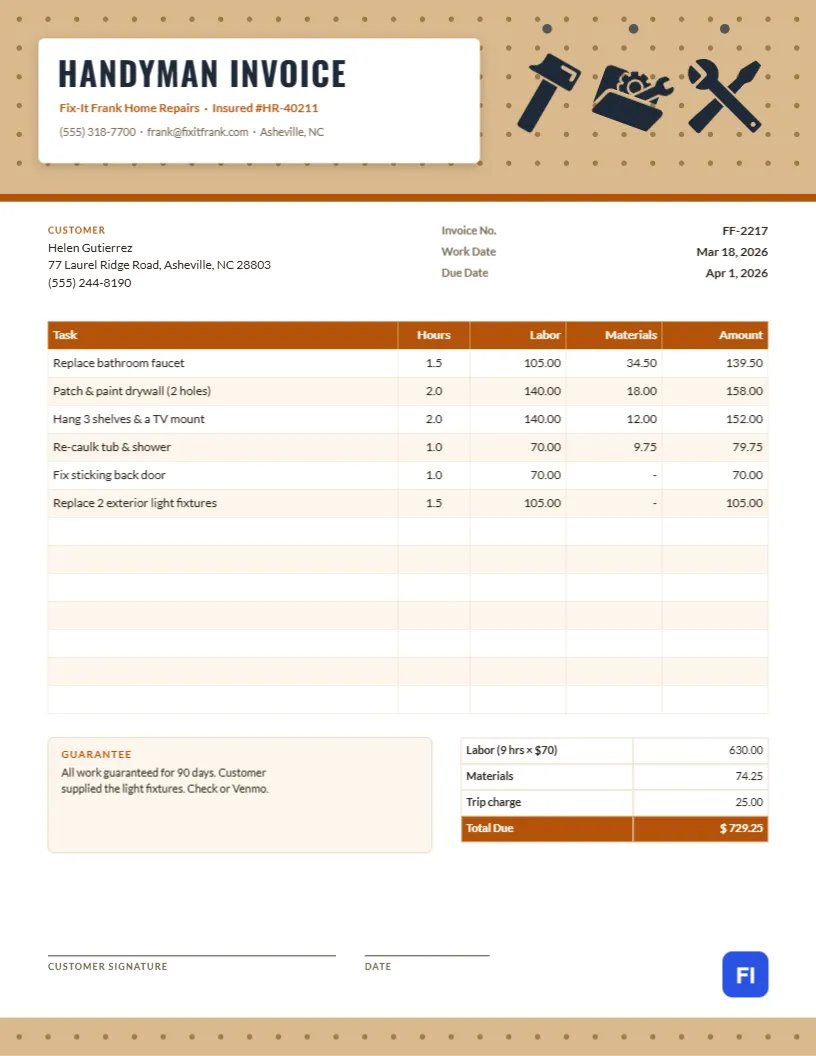
The template fits independent handymen, home repair companies, property maintenance technicians, furniture assemblers, TV mounting services, and anyone doing small jobs around homes and rental properties. The sample shows Fix-It Frank Home Repairs billing a homeowner in Asheville for replacing a bathroom faucet, patching and painting drywall, hanging shelves and a TV mount, re-caulking a tub, fixing a sticking back door, and replacing two exterior light fixtures.
A Pegboard Wall With Tools on Hooks
The header is a tan pegboard, the perforated hardboard every garage workshop has, drawn with rows of small brown holes and edged with a copper-orange stripe along the bottom. A white card with a soft shadow is pinned to the board, carrying HANDYMAN INVOICE in charcoal Oswald capitals, the business name and insurance number in copper, and the phone, email and town. To the right, three tools hang from pegs on the board: a hammer, a toolbox and a wrench crossed with a screwdriver, each drawn in charcoal. A strip of the same pegboard runs across the bottom of the page.
The customer block and the invoice number, work date, and due date follow. The task table has five columns: Task, Hours, Labor, Materials, and Amount. A Guarantee note sits beside the totals, which split labor (hours times rate) from materials, add a trip charge, and end with a copper Total Due. Lines for the customer’s signature and the date sit above the pegboard footer.
Common Handyman Jobs: Flat Rate or Hourly?
Customers like knowing the price in advance, and many handymen quote flat rates for common jobs while billing larger or unpredictable work by the hour. A simple guide:
| Job | Usually Billed | Why |
|---|---|---|
| TV wall mount | Flat rate | Predictable time and hardware |
| Faucet or light fixture swap | Flat rate plus parts | Standard job, parts vary |
| Drywall repair | Hourly | Drying time and number of coats vary |
| Door and window adjustments | Hourly | Cause is often hidden |
| Furniture assembly | Per item | Customers compare with store prices |
The sample bills everything hourly at $70, which keeps a mixed list of small jobs simple.
Showing Labor and Materials per Task
Each task row shows hours, the labor cost, the materials cost, and the line total. It lets the customer see, for example, that the faucet job was $105 in labor and $34.50 in parts. Where the customer supplied the parts, like the light fixtures in the sample, enter a dash in Materials and say so in the notes. Across the sample, nine hours of labor come to $630.00, materials to $74.25, and the trip charge to $25.00, for a total of $729.25.
Materials Markup
Many handymen add a markup to materials to cover time spent shopping, returns, and waste, often 10 to 20 percent. If you do, include it in the materials figures rather than as a separate line, and keep receipts in case a customer asks. Customers rarely object to a modest markup when the invoice is clear, and the work is good.
Updating the Task Table
The task table is a real editor table. Double-click it or open Edit Table Data, then type in your tasks, hours, and costs, adding rows with + Add Row or removing extras with – Remove Last. The table text does not calculate, so multiply hours by your rate, add materials for each line, and total the columns yourself.
Guarantees Build Repeat Business
A short written guarantee, such as the sample’s ninety days on all work, costs little and reassures customers who are letting a stranger work on their home. It also sets a clear limit, so a repair made two years ago does not become a free callback. Write the guarantee on every invoice.
Customizing the Pegboard and Tools
The pegboard is grouped with its holes, so it recolors in one step; a white or gray board suits a more modern brand. The tools are editable vectors that can be recolored, swapped for a drill, a saw, or a paint roller, or rearranged on their pegs. Update the business name and insurance number on the card.
Printing on the Job
The page is US Letter, 8.5 by 11 inches. Many handymen finish a job, fill in the invoice on a phone or tablet, and email it before leaving. If you print on site, plain paper is fine; the tan pegboard prints as a light brown on most printers.
Landlords and Property Managers as Clients
Rental property owners often send steady work, and they need invoices they can match to each unit. Add the unit or property address in the customer block, even if the bill goes to the owner’s office, and list tenant-reported issues separately from general maintenance. Owners appreciate an invoice that shows at a glance which property the work was for.
Photos of Finished Work
A before-and-after photo is the best proof of a job well done. Take one of each repair and attach them to the invoice email, or keep them in a folder named with the invoice number. If a customer or property manager questions the work weeks later, the photos settle it quickly, and the best ones make great posts for your business page.
Handyman Invoice FAQs
Can I charge a minimum?
Yes. Many handymen have a one- or two-hour minimum. Note it in the guarantee box or as a line.
Do I need to show my insurance number?
It is not always required, but it reassures customers and property managers, so it sits on the header card.
How do I bill a second visit for paint to dry?
Add a row for the second visit with its date and any extra trip charge.