A repair order is a legal record in many states, a warranty document for the customer, and a history of the vehicle for your shop. It has to show exactly which car was worked on, which parts went in, how many labor hours were billed, and what the technician recommends next. This Auto Repair Invoice Template holds all of that on one clear page, with a bold garage look that fits an independent shop, a mobile mechanic, or a small dealership service desk.
Shops, Mobile Mechanics and Service Writers
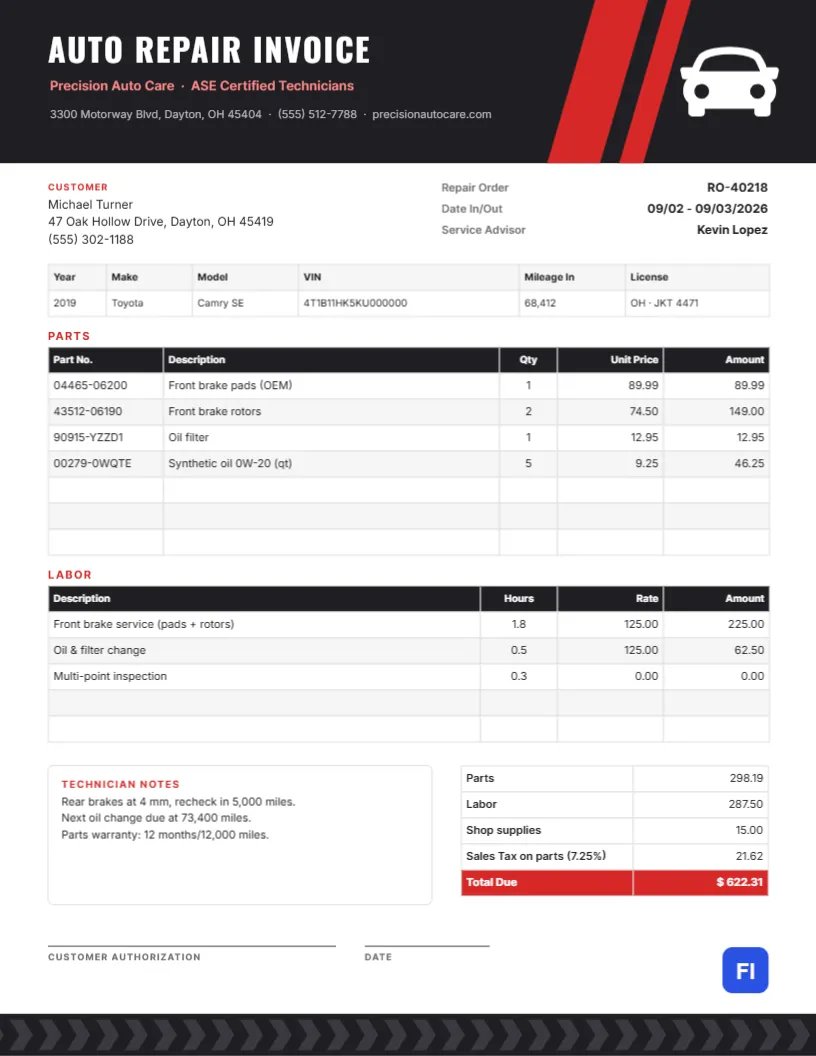
The layout is made for independent auto repair shops, brake and tire centers, quick lube shops, mobile mechanics, motorcycle and small engine repairers, and fleet maintenance providers. The sample shows Precision Auto Care billing Michael Turner for work on a 2019 Toyota Camry SE: front brake pads and rotors, an oil filter and synthetic oil, brake service labor, an oil and filter change, and a multi-point inspection.
Charcoal, Red Slashes and a White Car
The header is a charcoal band with two diagonal red stripes slicing through its right side, like racing stripes on a hood. A white car icon, seen from the front, sits in the right corner. On the left, AUTO REPAIR INVOICE is set in white Oswald capitals, with the shop name and ASE Certified Technicians in soft red and the address, phone, and website below. At the foot of the page, a strip of tyre-tread chevrons runs across the bottom edge, echoing the header.
In the body, the customer block sits on the left and the repair order number, dates in and out, and the service advisor on the right. A six-column vehicle strip records year, make, model, VIN, mileage in, and license plate. Two tables follow: Parts, with part number, description, quantity, unit price, and amount; and Labor, with description, hours, rate, and amount. A Technician Notes box sits beside the totals, which show parts, labor, shop supplies, sales tax on parts, and a red Total Due. Lines for the customer’s authorization and the date finish the page.
Repair Invoice Terms, Decoded
Customers do not always know the vocabulary. This short glossary explains the terms used on the invoice, and you can paste it into your shop’s FAQ or email:
- Repair order (RO): The shop’s reference number for this visit. Quote it when you call about the job.
- VIN: The 17-character vehicle identification number, unique to the car. It confirms which vehicle was repaired.
- Part number: The manufacturer’s or supplier’s code for the part installed, used for warranty claims.
- Labor hours: Usually book time: the standard time a job takes according to a labor guide, not necessarily the minutes on the clock.
- Shop supplies: A small charge for consumables such as cleaners, rags, and lubricants used during the repair.
- Customer authorization: Your signature approving the work, often required by state consumer protection rules before repairs begin.
Filling In the Vehicle Strip
Copy the VIN from the dashboard plate or door jamb rather than from memory, and record the mileage when the car comes in. The license plate with its state helps if the customer owns two similar cars. These details matter for warranty claims, recalls, and, if the car is ever sold, for showing a complete service history.
Separating Parts From Labor
Keeping parts and labor in separate tables is standard in the trade, because many states tax parts but not labor and because customers compare each against quotes from other shops. List parts with the part number and a plain description [Front brake pads (OEM)]. For labor, describe the operation and use book hours at your posted rate. Diagnostic time can be its own labor line.
Editing Both Tables
Parts and Labor are each a true editor table.Double-click to edit the cells, or use Edit Table Data to add lines with + Add Row and remove unused ones with – Remove Last. If your shop management software exports parts lists as CSV, Import CSV brings them straight into the Parts table. The cells do not calculate by themselves, so recalculate each amount, the parts and labor totals, shop supplies, tax, and total due after you make changes.
Technician Notes That Bring Customers Back
The notes box records what the technician saw and what should happen next: Rear brakes at 4 mm, recheck in 5,000 miles or Next oil change due at 73,400 miles. These notes are honest reminders, not hard sells, and customers who see them usually book the next service with you. Add your parts warranty here too, such as twelve months or twelve thousand miles.
Making It Your Shop’s Invoice
The car icon is an editable vector: recolor it from its swatches or swap it for a motorcycle, truck, or wrench from the library. The red slashes and the tread footer can take your brand color; blue or orange works just as well as red. Update the shop name, address, and certification line, and the invoice is ready.
Printing at the Service Counter
The page is US Letter, 8.5 by 11 inches. Print it for the customer to sign at pickup and email the PDF for their records. The charcoal header uses a fair amount of toner; if you print a second copy for your files, greyscale is fine. Keep signed copies for as long as your state requires, often several years.
Estimates, Approvals and Surprise Findings
Once a car is on the lift, technicians often find more than the customer came in for. Call before doing any extra work, record the approval (who, when, and how) in the notes, and list the added work as separate lines on the final invoice. Customers rarely argue with a bill that matches what they approved on the phone, and your shop is protected if they later forget the call. If they decline a recommended repair, write Customer declined beside it in the notes.
Auto Repair Invoice Questions
Do I need the customer’s signature before starting work?
Many states require written authorization for repairs above a certain amount. Use the authorization line on the estimate and again on the final invoice.
Can I show a used or rebuilt part?
Yes, and in many places you must. Add Used or Rebuilt to the part description.
Where do I show a coupon or fleet discount?
Add a negative row in the totals table above the Total Due line.