Heating and cooling technicians do two kinds of work: repairs, when something breaks, and maintenance, when nothing has broken yet. Both deserve a clear invoice, but maintenance visits especially need to show value, because the customer cannot see what was done inside the unit. This HVAC Service Invoice Template records the equipment, the parts and labor, a ticked maintenance checklist, and the technician’s recommendations, so every visit is documented, and every charge makes sense.
For Heating, Cooling, and Refrigeration Techs
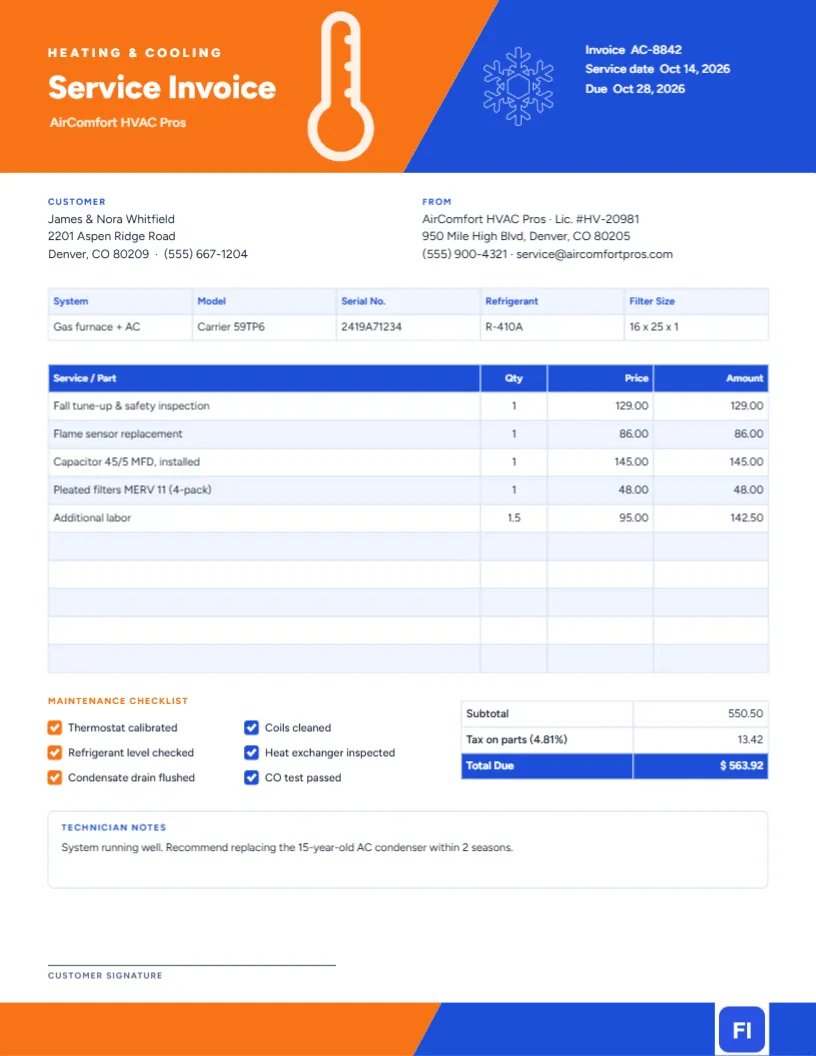
Use it for furnace and air conditioner tune-ups, heat pump repairs, boiler service, ductless mini-split installs, and refrigeration calls. The sample shows Air Comfort HVAC Pros invoicing a Denver homeowner for a fall tune-up and safety inspection, a flame sensor, a 45/5 MFD capacitor, a four-pack of MERV 11 filters, and extra labor.
Hot Meets Cold in the Header
The top of the page is split by a bold diagonal line. The left side is warm orange and carries a white thermometer icon; the right side is deep blue and carries a white snowflake. It is a simple, instantly readable picture of what you do: heating and cooling. On the orange side, HEATING & COOLING is set in small, spaced capitals above Service Invoice in large white Figtree, with the company name underneath. On the blue side, the invoice number, service date, and due date are listed in white.
Below, the Customer and From blocks sit side by side. An equipment strip records the system type, model, serial number, refrigerant, and filter size. The service and parts table follows, then a Maintenance Checklist with six ticked items in alternating orange and blue, a totals table, a Technician Notes box, and a customer signature line. The bottom of the page repeats the orange-and-blue split in a slim footer band.
A Seasonal Maintenance Calendar to Share With Customers
Many HVAC companies sell maintenance plans, and the invoice is the ideal place to remind customers when you will be back. A simple schedule like this one can go in your follow-up email:
| Season | Visit | Typical tasks |
|---|---|---|
| Early spring | Cooling tune-up | Clean condenser coils, check refrigerant, test capacitor, clear condensate drain |
| Early fall | Heating tune-up | Inspect heat exchanger, clean flame sensor, test CO, check igniter |
| Every 1–3 months | Filter change | Replace filter; the size is on the invoice’s equipment strip |
| Yearly | Thermostat check | Calibrate, replace batteries, review schedule |
Recording the Equipment Correctly
The equipment strip saves time on the next visit and is invaluable for warranty claims. Copy the model and serial number from the data plate on the unit, note the refrigerant type (R-410A, R-32, or R-22 on older systems), and record the filter size so the homeowner can buy the right one. If the home has more than one system, add a second strip or list both in one row separated by a slash.
What the Checklist Tells the Homeowner
A tune-up can look like the tech was here for an hour from the customer’s side. Ticking each completed task, such as thermostat calibrated, coils cleaned, heat exchanger inspected, and CO test passed, turns that hour into a list of real work. Edit the checklist labels to match your own maintenance procedure; each label is plain text next to a tick box that you can keep or remove.
Service Lines, Parts and Tax
The service table is an editor table: double-click it to change the text, or use Edit Table Data to add lines with + Add Row and remove extras with – Remove Last. List flat-rate tasks with a quantity of 1, parts with their specification (Capacitor 45/5 MFD, installed), and extra labor in hours. The cells do not calculate on their own, so work out the subtotal, tax, and total due yourself after editing. The sample charges tax on parts only.
Technician Notes and Recommendations
The notes box is where you earn the next job honestly. In the sample, the technician recommends replacing a fifteen-year-old AC condenser within two seasons. Written recommendations give customers time to budget and protect you if the unit fails later. Keep the tone factual: what you observed, why it matters, and a rough timeframe.
Making the Colours Match Your Brand
The two header shapes are grouped. Select the group to move it, or select each shape to change its colour. Orange and blue say heating and cooling universally, so most companies keep them and simply adjust the shade. The thermometer and snowflake are editable vectors: recolour them from their swatches or swap them for a flame and fan icon from the library.
Print, Tablet or Email
The page is US Letter size, 8.5 x 11 inches. It works well on a tablet in the field and as an emailed PDF. When printing, choose standard or high quality so the solid orange and blue header prints without banding. Leave a printed copy on the furnace or in the utility room if the customer is not home.
Refrigerant, Parts Warranties and Your Records
If you add refrigerant, record the type and the amount in pounds as its own line. Some regions require technicians to keep refrigerant records, and customers with leaking systems will want to see how much was added on each visit. For parts under manufacturer warranty, such as a compressor or a control board, write warranty part, no charge, and bill only the labor, so the customer understands why the price is lower than expected and your records show the claim.
HVAC Invoice Questions
Can I use this for commercial rooftop units?
Yes. Record the unit tag or rooftop number in the System field and list each unit’s work separately.
How do I show a maintenance plan discount?
Add a totals row such as Maintenance plan discount (15%) with a negative amount above the total.
Can I bill a diagnostic fee?
Yes. Add Diagnostic fee as the first line; many companies waive it when the customer approves the repair, which you can show as a matching negative line.
Can I untick checklist items?
Yes. Delete the tick mark or replace the filled box with an empty one for tasks you did not perform.