If you are paid by the hour, your invoice is only as convincing as your time records. Clients want to see when you worked, how long, and on what, not just a total. This Hourly Timesheet Invoice Template combines the two documents into one: a day-by-day log of your hours and a clean invoice that multiplies them by your rate. It suits bookkeepers, contractors, freelancers, temps, tutors, and anyone else who tracks time.
Why Combine a Timesheet and an Invoice?
Many hourly workers send a timesheet to one person and an invoice to another, then wait while the two are matched up. Putting both on a single page removes that step. The client’s manager can approve the hours and accounts payable can pay the total from the same document. It also protects you: if hours are ever questioned, the log is already on the record, dated and described.
Slate Header, Clock Face and Teal Accents
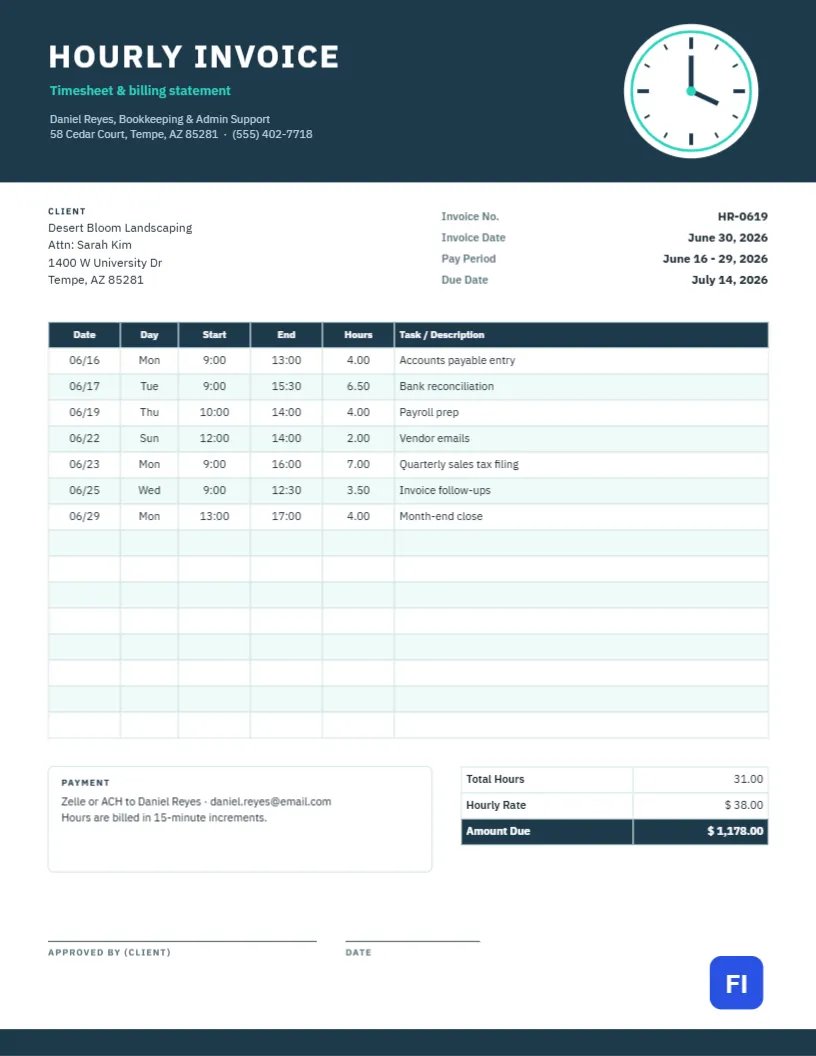
A wide slate-blue band runs across the top of the page. On the left, HOURLY INVOICE is set in white IBM Plex Sans capitals with the subtitle Timesheet & billing statement in teal, followed by your name, trade, and contact details. On the right, a large clock face with teal hour marks and hands sits in a white circle, the one motif that says billed by time before anyone reads a word. A thin teal rule underlines the header.
Below, the client block sits on the left, and four facts line up on the right: invoice number, invoice date, pay period, and due date. The main table has six columns: Date, Day, Start, End, Hours, and Task/Description. Under it, a payment note explains how you want to be paid and how hours are rounded, and a totals box shows total hours, hourly rate, and the amount due. Two signature lines at the bottom, one for approval by the client and one for the date, make it easy to get sign-off.
How to Round Your Hours Consistently
Clients accept rounding when it is consistent and stated. Pick an increment and use it every time. The sample says hours are billed in 15-minute increments. This table shows how common increments turn minutes into billable hours.
| Minutes worked | 6-minute (0.1 hr) | 15-minute (0.25 hr) | 30-minute (0.5 hr) |
|---|---|---|---|
| 10 minutes | 0.2 | 0.25 | 0.5 |
| 25 minutes | 0.5 | 0.5 | 0.5 |
| 40 minutes | 0.7 | 0.75 | 1.0 |
| 1 hr 50 min | 1.9 | 2.0 | 2.0 |
Lawyers and accountants often use tenths of an hour; most trades and freelancers use quarter hours. Whatever you choose, write it in the payment note.
Filling In the Daily Log
Enter one row per work session. Write the date as MM/DD, the day of the week, the start and end times, the hours as a decimal, and a short description of what you did. Descriptions matter more than people think: Bank reconciliation or Quarterly sales tax filing tells the client why the hours were needed. If you worked two separate sessions on the same day, use two rows rather than one long one.
The table is a real editor table, so you can double-click it to type, add rows for a busy period with + Add Row, or trim empty ones with − Remove Last. If you already track time in a spreadsheet or time-tracking app, export the entries as CSV and bring them in with Import CSV rather than retyping them.
Totalling Hours and Pay
Add up the Hours column and enter the result in Total Hours. Multiply it by your hourly rate for the Amount Due. The table cells hold plain text, so they will not add up by themselves; do the sums on a calculator or in your spreadsheet and type in the results. Double-check that the total hours match the sum of the log, because that is the first thing a careful client will verify.
Approval Signatures and Pay Periods
For weekly or biweekly billing, set the pay period to match the client’s payroll or accounts payable cycle. The approval line lets a manager sign off on the hours before the invoice goes to finance. If your client approves timesheets electronically, you can delete the signature lines and note Approved by email, June 30 in the payment box instead.
Customizing the Clock and Colour Scheme
The clock face is built from simple shapes grouped, so you can recolour its hands and marks or move the whole group. The slate header is one rectangle; change its fill and the table header to your brand colour. Teal is used for the subtitle, the rule, and the clock marks, so update all three together if you pick a new accent.
Filing Each Pay Period’s Copy
The template is 8.5 by 11 inches, US Letter. Save a PDF for each pay period with the dates in the file name, for example “Hours-June16-29-2026.pdf”. If a client asks for a paper copy to sign, print on ordinary copy paper; the slate header prints well on both inkjet and laser printers. Keep your signed copies for at least as long as your tax records.
What Happens When the Client Disputes Your Hours
Disagreements over hours are usually about a single day or a single task, not the whole invoice. Because every session is listed with start and end times, you can point to the exact row in question. Offer supporting evidence if you have it, such as emails sent that afternoon or the files you worked on, and be willing to write off a small amount if the relationship matters more than half an hour. To prevent disputes, send the timesheet for approval at the end of each week, even if you invoice every two weeks; problems caught on Friday are far easier to settle than problems found a month later.
Timesheet Invoice Questions
Can I bill overtime at a higher rate?
Yes. Add a second totals row for overtime hours and the higher rate, and mark the overtime sessions in the log.
What if I bill different rates for different tasks?
Add a Rate column to the log and calculate each row separately, then sum the amounts instead of multiplying total hours.
Is this a legal timesheet for employees?
It is designed for independent contractors billing clients. Employees should use their employer’s official timekeeping system.