Freelancers send invoices to people who hired them for their taste. If you design logos, illustrate packaging, or build brand identities, a generic spreadsheet-style bill undersells you. This Freelance Designer Invoice Template is itself a small piece of design: bold Bauhaus shapes, a lowercase wordmark, and a warm cream background, with all the practical details a client’s finance team needs sitting underneath.
Built for Creatives Who Bill by the Project
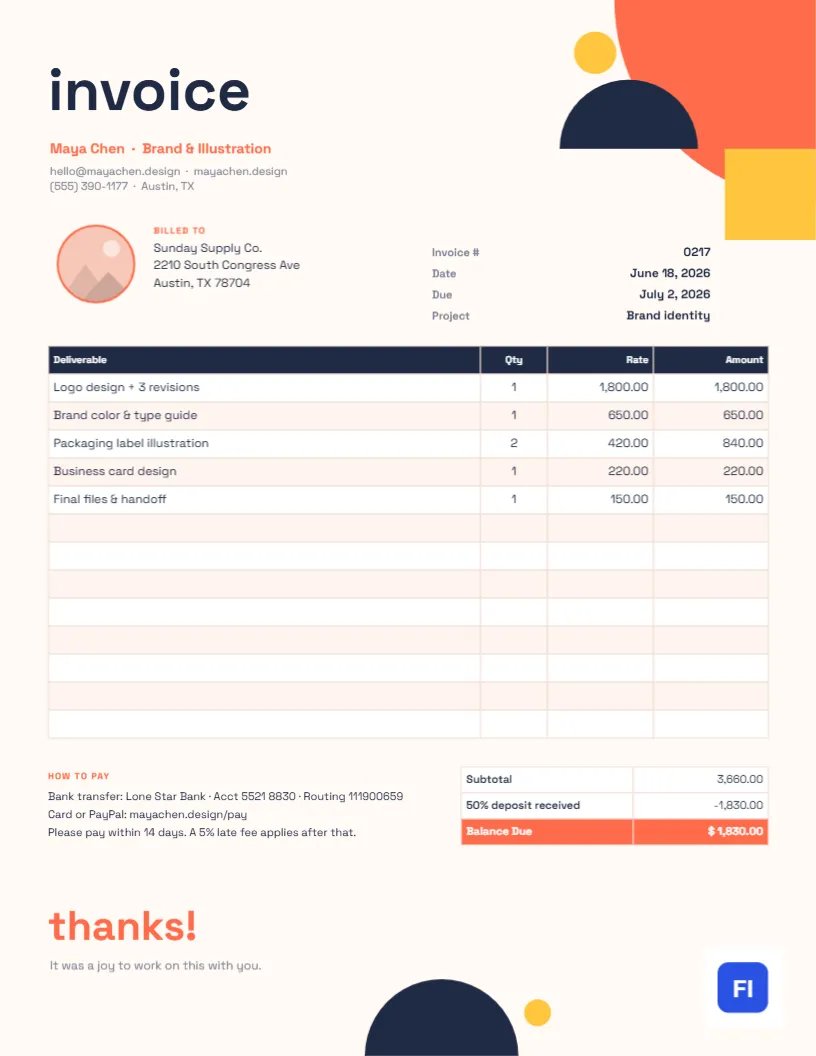
The layout suits graphic designers, illustrators, brand strategists, UX designers, animators, letterers and anyone who sells creative projects to small businesses and agencies. The sample shows Maya Chen, a brand and illustration freelancer, billing Sunday Supply Co. for a logo with three revisions, a color and type guide, packaging label illustrations, a business card, and final file hand-off. It includes a line for the 50% deposit already received, which is how most creative projects are paid.
Coral, Navy and Yellow on Cream: The Look
In the top-right corner, a cluster of flat shapes borrowed from the Bauhaus school does the talking: a coral quarter-circle, a navy half-circle, and a sunny yellow square overlapping in a confident composition. On the left, the word invoice is set in huge lowercase Space Grotesk, followed by your name and specialty in coral and your website, email, and phone number underneath. A circular portrait or logo slot with a coral outline sits beside the Billed To block, and the invoice number, date, due date, and project name line up on the right.
The itemized table uses a navy header on the cream page with light peach striping. Under it, a How to Pay note lists bank details and a late-fee line, and the totals box shows the subtotal, the deposit received, and a coral Balance Due. At the very bottom, thanks! in large coral letters and a one-line personal note finish the page, with a small navy half-circle and a yellow dot echoing the shapes at the top.
Setting Up a Deposit and Balance Schedule
Creative work usually runs over weeks, and asking for part of the fee up front protects you if a project is cancelled. The sample splits the fee 50/50, but other schedules are common. Choose one, put it in your proposal, and reflect it on each invoice.
| Project size | Common schedule | Invoices you send |
|---|---|---|
| Small (under $1,000) | 100% on approval, or 50/50 | One or two |
| Medium ($1,000-$5,000) | 50% deposit, 50% on delivery | Two |
| Large (over $5,000) | 40%/30%/30% at milestones | Three |
| Ongoing retainer | Monthly in advance | One per month |
On the final invoice, list the full project and subtract the deposit, as this template does, so the client sees the whole picture in one place.
Line Items That Explain Your Value
Clients approve creative invoices faster when each line names a deliverable they recognize. Logo design + 3 revisions is clearer than Branding; Packaging label illustration × 2 shows exactly what they got. Include revision rounds in the description so extra rounds can be billed separately later. If you licensed usage rights or bought fonts or stock images on the client’s behalf, give those their own rows.
Personalizing the Portrait, Colors and Shapes
The coral-ringed circle next to the client block is a photo slot: select it and use Replace Image to add your head shot or logo mark. The frame stays round and keeps its size. Each Bauhaus shape is a separate object, so you can change its color, nudge it, or delete it. If your personal brand uses teal and mustard rather than coral and yellow, recolor the shapes, the name line, and the Balance Due row to match, and the page will feel custom-made. Keep the cream background: it softens the strong shapes and makes the page feel less corporate.
Editing the Table and Keeping the Math Right
The deliverables list is an editable table object. Double-click it to type into the cells, and use + Add Row or – Remove Last to change the number of lines. The cells hold text, so amounts do not update automatically; after editing, add up the lines again, work out the deposit, and update the subtotal and Balance Due. A quick check with a calculator avoids the awkward email that starts I think there’s a mistake on the invoice.
When a Client Asks for Changes to the Invoice
Agencies and larger companies sometimes return an invoice asking for a PO number, a different billing entity, or a split across two budgets. Do not edit the original and resend it under the same number. Duplicate the page, keep the invoice number with a suffix such as 0217-A, make the change, and note in your email what was corrected. Your records will then show both versions, and the client’s accounts team will not wonder whether they have already paid it. If the client disputes a line, such as an extra revision round, point to the agreed scope in your proposal and offer to discuss it before the due date rather than after.
Sending It Like a Designer
Export a PDF and name it clearly, for example, Chen-Invoice-0217-SundaySupply.pdf. The page is 8.5 x 11 inches, US Letter, which is also what your clients’ printers expect. If you want a printed version for your portfolio of paperwork, a bright white matte paper keeps the coral and yellow crisp. Avoid glossy paper; the large flat shapes can show streaks.
Small Habits That Get Freelancers Paid Faster
Invoice on the day you deliver, while the client is still excited about the work. Put the due date in the email subject line. Offer card payment through a link if you can, because many small businesses pay by card faster than bank transfers. And keep the tone of your note as friendly as the thanks! at the bottom of the page.
Freelance Invoice FAQs
Should I charge for extra revisions?
If your agreement lists a set number of revision rounds, bill extra rounds as separate lines on this invoice.
Can I remove the Bauhaus shapes for a quieter look?
You can delete or recolor any of them, but keep at least the top cluster; it is what gives the page its character.
What if the project was paid in full up front?
Change the deposit row to Paid in full and set the balance to zero, or relabel the page as a receipt.
Does the lowercase title look unprofessional?
For creative work, it reads as intentional styling. If your clients are very formal, retype it in capitals.