Lawn care is repeat business. Most customers pay for weekly or biweekly mowing all season, plus the occasional extra job like mulch or shrub trimming, and they would much rather receive one tidy invoice at the end of the month than a slip of paper after every visit. This Lawn Care Invoice Template is built for monthly billing: each visit gets its own dated row, extras sit alongside the regular service, and the whole month adds up to one amount due.
Ideal for Mowing Crews and Landscapers
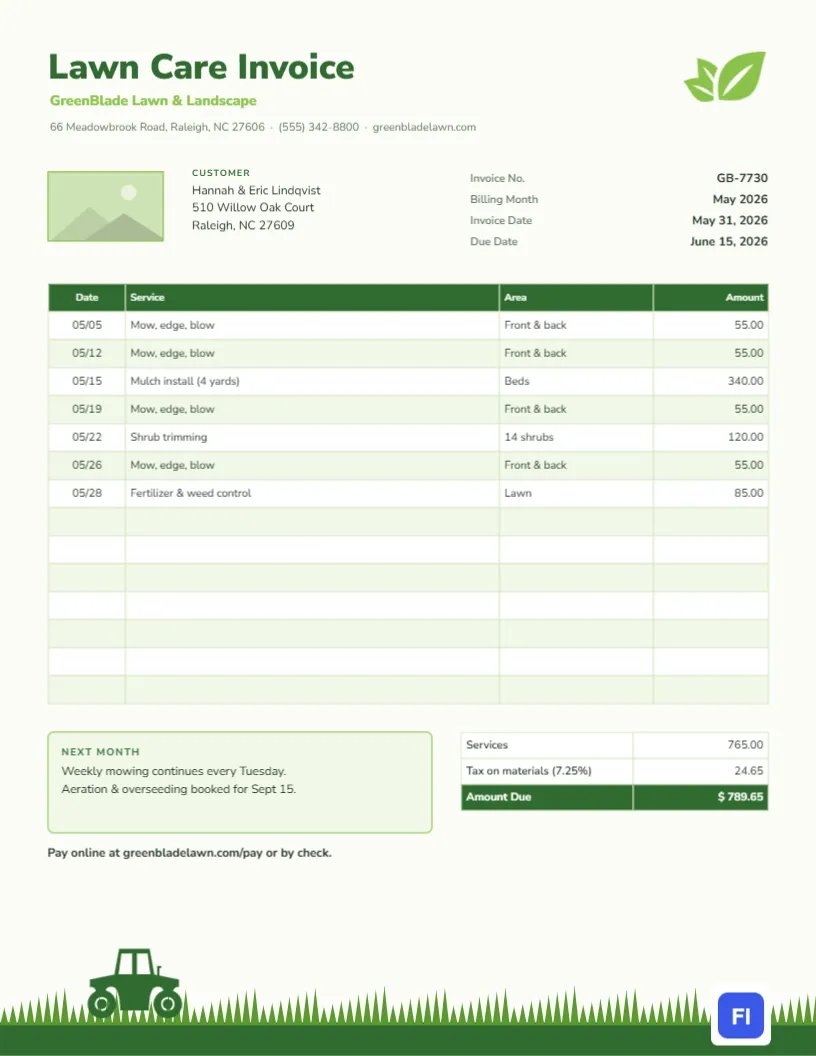
Solo mowers, lawn care companies, landscapers, gardeners, property maintenance crews, and even teenagers running a neighbourhood mowing business can use it. It also works for snow removal in winter, since the structure is the same: dated visits, a short description, and a price. The sample shows GreenBlade Lawn & Landscape billing the Lindqvist family for May, with four mow-edge-blow visits, a four-yard mulch install, shrub trimming, and a fertilizer and weed control treatment.
Green on Green: How the Page Is Styled
The background is a very pale green, like morning light on a lawn. At the top left, set Lawn Care Invoice in heavy dark green Nunito Sans, with the company name in fresh lime green underneath, followed by the address, phone number, and website. A lime leaf icon sits in the top-right corner. Below the header, a rectangular image slot sits beside the customer’s name and address; use it for your logo or a photo of your best work. Align the invoice number, billing month, invoice date, and due date on the right.
The visit table runs across the page with a deep green header and lime-tinted stripes, in four columns: Date, Service, Area, and Amount. Under it, a lime-bordered Next Month note sits beside the totals, which list services, tax on materials, and a highlighted amount due. A bold line invites the customer to pay online or by check. At the very bottom of the page, a band of grass blades rises from the edge, and a small green tractor rolls across it, the playful signature of the design.
A Season at a Glance: Sample Lawn Program
If you sell a full-season program, the invoice is a good place to remind customers what comes next. Here is a typical calendar for a cool-season lawn, which you can adapt for your region:
| Month | Regular service | Seasonal add-on |
|---|---|---|
| March-April | Spring clean-up, first mow | Pre-emergent crabgrass control |
| May | Weekly mowing | Mulch beds, fertilizer |
| June-August | Weekly or biweekly mowing | Shrub trimming, grub control |
| September | Weekly mowing | Aeration and overseeding |
| October-November | Mowing as needed | Leaf removal, winterize fertilizer |
Use the Next Month box to mention the upcoming add-on, as the sample does with its aeration and overseeding booking.
Logging Each Visit in the Table
Write one row per visit, with the date in MM/DD format, the service performed, the area covered, and the price. The Area column is what makes this template different from a generic invoice: Front & back, Beds, 14 shrubs, or Side yard tells the customer exactly where you worked. If a visit was skipped because of rain, you can add a row that says Rained out, no charge, so the customer is not left wondering.
The table is an editor table object with fifteen rows ready. Double-click it to type, or choose Edit Table Data, then use + Add Row for a busy month with more visits and – Remove Last if you only need a few rows.
Adding Up the Month
The cells hold typed text, not formulas, so total the Amount column yourself and enter it in the Services line. If you sell materials such as mulch or fertilizer, some states charge sales tax on the materials portion; the sample applies 7.25% to the mulch and fertilizer lines only. Add the tax to the services total for the amount due. A note in your phone or a simple spreadsheet per customer makes this a two-minute job at month-end.
Your Logo, Your Photos, Your Colors
The rectangle next to the customer block is a placeholder image. Select it and press Replace Image to insert your logo or a photo of a freshly striped lawn; it keeps its frame. The leaf and tractor are editable vectors, so their colors can be changed from their swatches. The grass band is a single group; move it, recolor it, or make it taller. If your company colors are blue or orange, change the headline and table header, but keep the grass green; it is the part customers remember.
Getting Paid Every Month Without Chasing
Send invoices on the same day each month, such as the last day, and set the due date two weeks later. Offer an online payment link, as the sample does, and consider a small discount for customers who prepay the season. For regular customers, a card kept on file and charged on the due date removes the chase altogether; mention it in the payment line so customers know it is available.
Paper and Printing Notes
The page measures 8.5 by 11 inches, US Letter. It looks best sent as a PDF, where the pale green background and the grass footer show as intended. If you leave printed invoices in mailboxes or door hangers, print on bright white paper; the pale green background will print lightly on most printers, which is fine, and the grass and tractor print clearly in dark green.
Handling Price Changes Mid-Season
Fuel and labor costs sometimes force a mid-season price change. If that happens, tell customers a month in advance and show the new price from a clear date on the invoice, with a short note in the Next Month box explaining the change. Keeping earlier visits at the old price and later visits at the new one shows fairness, and most customers accept a small increase when it is communicated in writing.
Lawn Invoice Questions
Can I bill per visit instead of monthly?
Yes. Use one row for the visit and change Billing Month to Service Date.
How do I show a seasonal contract price?
Enter one row such as Season mowing contract, installment 2 of 7 with the monthly amount.
Can I use it for snow plowing?
Yes. Change the title, swap the leaf for a snowflake icon from the library, and log each storm as a row.
Does the tractor have to stay?
No, but it gives the page personality. You can replace it with a mower or leaf blower icon if you prefer.