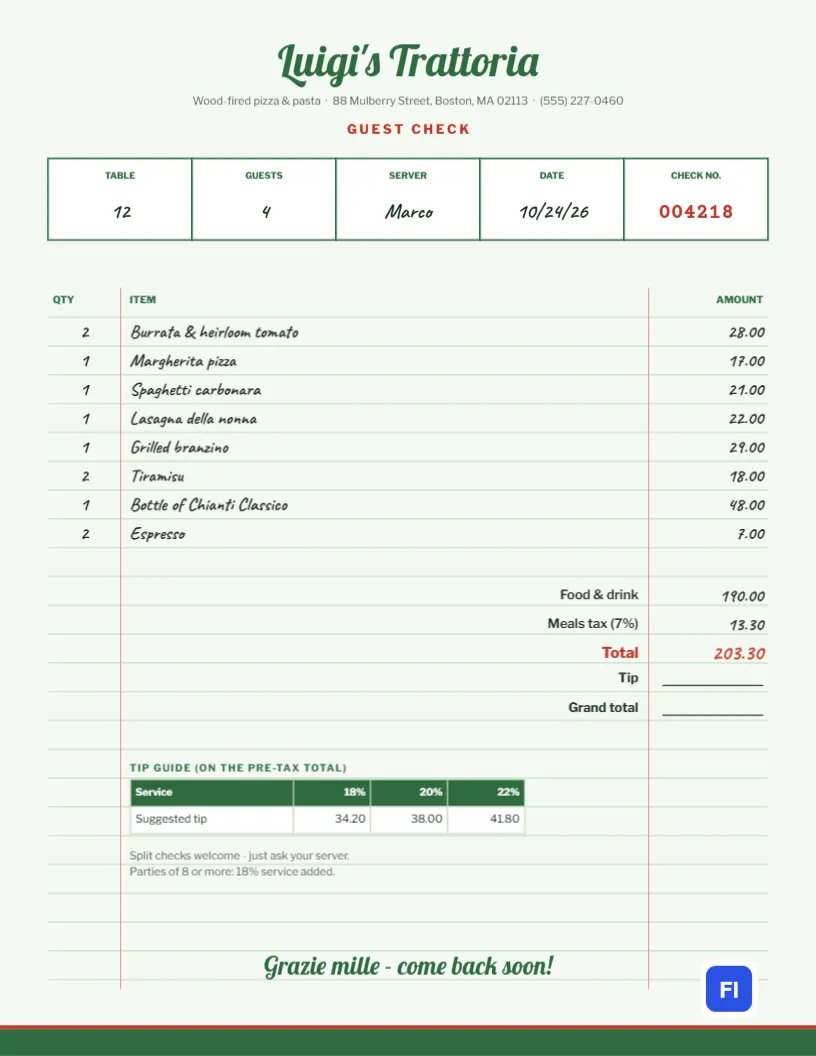
Few documents are as familiar as the restaurant guest check: the pale green paper, the little boxes for table and server, the red check number, and the items written by hand. It is simple, and it works. This Restaurant Guest Check Template brings that classic look to a full page you can edit and print, whether you run a traiteur, a diner, or a food truck with a few tables, or need a bill for a private dinner or a catered event.
Who Needs a Printable Guest Check
Not every restaurant has a point-of-sale system that prints a neat bill. Small cafes, pop-up dinners, supper clubs, private chefs, food trucks with seating, bed and breakfasts serving dinner, and event caterers all need a clear, attractive bill. Larger restaurants use a printable guest check for private dining, group bookings, and outside events. The sample shows Luigi’s Traitor in Boston billing table 12, four guests served by Marco.
Green Ruled Paper and a Red Check Number
The page is a very pale green, ruled with fine green lines like a real check pad, with red margin lines on both sides of the item area. The restaurant name is written in Lobster script at the top, with a short description and the address and phone beneath, and GUEST CHECK spaced out in red. A row of five boxes records the table, the number of guests, the server, the date, and the check number, the last in red typewriter numerals, just like a pre-printed pad.
Below, the items are written in Caveat, a handwriting font, with quantity on the left and amount on the right, lined up on the ruled lines. The subtotal, meals tax, and total sit at the foot of the list, followed by blank lines for the tip and total. A small tip guide table shows suggested tips at 18%, 20%, and 22%, and a line about split checks and large-party service charges leads into Graze Mile – come back soon!.
A Tip Guide Customers Appreciate
Printing suggested tips saves guests from mental arithmetic and tends to lift tips slightly. The guide is calculated on the pre-tax total, which is the fair and common practice. For the sample’s $190.00 of food and drink:
| Tip rate | Suggested tip | When guests typically choose it |
|---|---|---|
| 18% | $34.20 | Good service |
| 20% | $38.00 | Great service |
| 22% | $41.80 | Exceptional service |
Update the three amounts whenever the subtotal changes.
Filling In the Check
Each item is a line of handwriting-style text on the ruled paper, so click the quantity, the item name, or the amount to change it. Keep item names short, as on a real check: Margarita pizza, not the full menu description. The sample’s eight lines come to $190.00; meals tax at 7% adds $13.30, for a total of $203.30 before tip.
Taxes, Service Charges and Split Checks
Meals tax rates vary by city and state, so change the label and amount to match yours. If you add an automatic service charge for large parties, show it as its own line above the total and explain it on the check, as the sample note does for parties of eight or more. For split checks, duplicate the page and divide the items among the guests.
The Tip Guide Table
The tip guide is an editor table. Double-click it to change the percentages or amounts, or open Edit Table Data to add a fourth column, for example, 15% for counter service. Its figures are typed, so recalculate them from your subtotal.
Branding Your Guest Check
The restaurant name, the tagline and the closing line can take your own words; a taqueria might close with gracious, vuelva pronto!. The green paper, ruled lines, and margins form a background that can be recolored to pale yellow or pink for a retro diner, and the Lobster title can be swapped for another display font from the list.
Private Dining and Group Menus
For private events with a set menu, list the menu as one line per course or as Set menu × 12 guests, then add drinks packages, room hire, and gratuity. The guest check format keeps the bill informal and friendly, which suits birthday dinners and rehearsal dinners better than a formal invoice.
Receipts for Business Diners
Business guests need a receipt with the restaurant’s name, address, date, items, and total for their expense claims. This check includes all of them. Print a copy after the tip is added and hand it back with the card, or email a PDF to guests who ask.
Printing Guest Checks
The template is a full letter-size page, which suits private dining and events. For busy service, print it, fill in the handwritten fields by hand with a pen instead, and keep a stack by the pass. The pale green background prints lightly and keeps the classic look.
Keeping Track of Checks
Numbering checks in sequence helps you reconcile sales at the end of the night and spot missing checks. Change the check number for each new bill and keep a copy of every check with the day’s takings, just as restaurants have always done with carbon-copy pads.
Comps, Voids and Manager Approval
Restaurants sometimes remove an item from a bill, for a dish sent back or a birthday dessert on the house. Rather than simply leaving it off, show it as a line with a zero or negative amount, such as Tiramisu, comped for birthday, and have a manager initial it. It keeps the kitchen’s tickets and the guest checks in agreement at the end of the night, and the guest can see the gesture.
Guest Check FAQs
Can I use this as a to-go order ticket?
Yes. Change the table box to To go and write the pickup time in the date box.
Should the tip be calculated before or after tax?
Before tax is standard, which is how the tip guide is calculated.
Can I add a QR code for payment?
Yes. Open QR/Barcode in the editor sidebar and add a URL code that links to your payment page.